

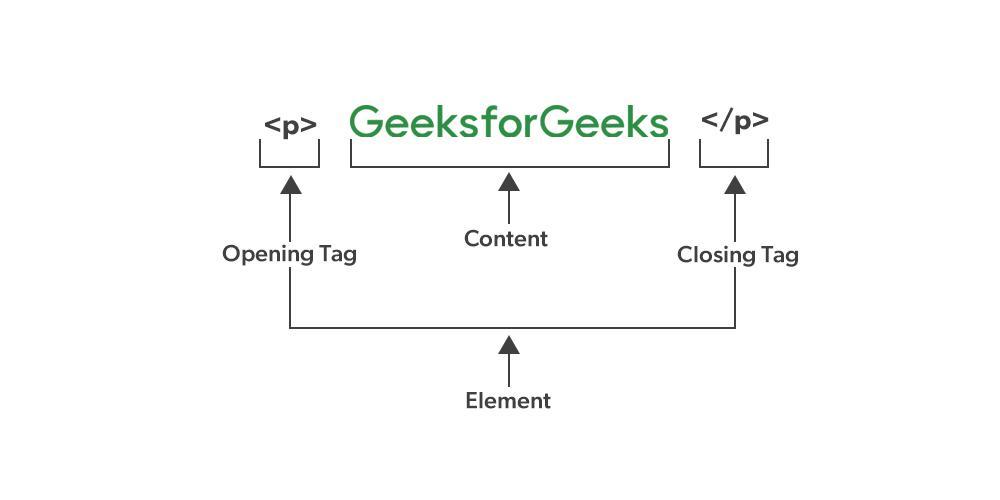
What Are Website Tags? (And How to Use Them Properly)
Hey there, fellow web enthusiasts! Have you ever stumbled upon the term “website tags” and found yourself scratching your head, wondering what it actually means? You’re not alone! In the vast ocean of web development and SEO jargon, tags might seem like just another buzzword. But here’s the kicker: understanding and utilizing website tags effectively can be a game changer for your online presence. Whether you’re a seasoned pro or just starting out, mastering tags can help improve your site’s organization, boost its visibility, and enhance user experience. So, grab a cup of coffee, and let’s dive into the world of website tags—what they are, why they matter, and how to use them like a pro! Trust me, by the end of this article, you’ll be ready to tag your way to success!
Understanding the Basics of Website Tags
Website tags are essential components of web development that help categorize and optimize your content for search engines and users alike. They are snippets of code embedded within your web pages, used to define and structure the content within those pages. Understanding these tags is crucial for both website organization and enhancing visibility in search engine results.
Tags can be broadly categorized into various types, each serving a specific purpose:
- Title Tags: These are critical for SEO, as they define the title of your webpage. They appear in search engine results and are what users click on to visit your site.
- Meta Tags: These provide metadata about your HTML document. They can include descriptions, keywords, and author information, influencing how search engines index your page.
- Header Tags: These tags (H1, H2, H3, etc.) help organize content hierarchically, making it easier for readers and search engines to understand the structure of your information.
- Image Tags: These tags enhance accessibility and SEO by providing alternative text for images, making them more comprehensible to search engines while improving user experience.
Utilizing these tags correctly can significantly impact your website’s performance. For instance, your title tag should be concise, include relevant keywords, and ideally be under 60 characters to ensure it displays fully in search results. This not only attracts clicks but also helps search engines understand your page’s topic.
Alongside title tags, incorporating meta descriptions is equally important. A well-crafted meta description should provide a brief overview of your page content, enticing users to click through. Aim for around 150-160 characters and include primary keywords to improve visibility.
Header tags are another vital aspect of your content structure. Using a clear hierarchy (H1 for main titles, H2 for subheadings, and so forth) helps both visitors and search engines navigate your content seamlessly. This structure is not only beneficial for SEO but also enhances readability, keeping your audience engaged.
| Tag Type | Purpose | Best Practices |
|---|---|---|
| Title Tag | Defines the page title for browsers and search engines | Keep under 60 characters, include main keywords |
| Meta Description | Summarizes the page content for search engines | Limit to 150-160 characters, use action words |
| Header Tags | Organizes content for better readability | Use a clear hierarchy (H1, H2, H3) |
| Image Alt Tags | Describes images for SEO and accessibility | Be descriptive, include keywords where relevant |
mastering the use of website tags is fundamental for anyone looking to enhance their online presence. By implementing effective tagging strategies, you not only improve your site’s SEO but also create a more navigable and engaging experience for your visitors. Whether you are a blogger, a business owner, or a web developer, investing time in understanding and using these tags correctly will pay dividends in the long run.

The Importance of Tags in SEO and User Experience
Tags serve as an essential tool for both search engine optimization (SEO) and enhancing user experience on a website. When used effectively, they can significantly boost your site’s visibility in search engine results and improve the way users interact with your content.
At the core of a website’s structure, tags help organize content into manageable categories. This organization is not just for the sake of neatness; it directly impacts how search engines crawl and index your website. By utilizing relevant keywords in tags, you can:
- Improve search rankings: Well-chosen tags can help your content rank higher in search results.
- Enhance discoverability: Users can find your content through related searches, increasing traffic.
- Boost click-through rates: Catchy tags can entice users to click on your links.
However, it’s important to strike a balance when implementing tags. Overloading your posts with tags can lead to confusion and dilute the effectiveness of each tag. Instead, focus on a few highly relevant tags that clearly describe the content. Here are some tips for proper tag usage:
- Be specific: Use tags that accurately reflect the content of your post.
- Limit the number: Aim for 5 to 10 tags per post to maintain clarity.
- Consider user intent: Think about what your audience might search for and tag accordingly.
From a user experience perspective, tags function as navigational aids. They allow users to quickly find related content, creating a sense of coherence throughout your site. A well-tagged website encourages exploration, keeping visitors engaged longer. Consider implementing a tag cloud or a dedicated tag archive page to enhance this experience.
Moreover, the implementation of tags can also enhance your site’s internal linking structure. By linking related posts through tags, you create pathways for users to discover more content that interests them. This not only increases page views but also helps establish your site as a valuable resource.
To illustrate the effectiveness of tags, consider the following table showing the correlation between proper tag usage and user engagement metrics:
| Tag Usage | Average Page Views | Average Time on Page |
|---|---|---|
| Well-structured tags | 500 | 3:30 mins |
| Poorly structured tags | 200 | 1:20 mins |
tags are more than just a formatting tool; they are a strategic asset in your SEO and user engagement toolkit. By understanding their importance and leveraging them effectively, you can create a website that not only ranks well in search engines but also provides a seamless user experience. Embrace the power of tags, and watch as your content thrives in both visibility and engagement.
Different Types of Website Tags You Should Know
When navigating the world of web development and SEO, understanding the different types of website tags is crucial. These tags not only enhance your site’s functionality but also improve its visibility on search engines. Here’s a breakdown of the key types you should know about:
- Title Tags: These are essential for SEO as they define the title of a webpage, appearing in search engine results and browser tabs. A compelling title tag can significantly increase click-through rates.
- Meta Tags: Located in the head section of your HTML, these tags provide metadata about your webpage, including descriptions, keywords, and author information. They play an important role in how search engines index your content.
- Header Tags (H1, H2, H3, etc.): These tags organize your content hierarchically. The H1 tag typically represents the main title, while H2 and H3 tags delineate subsections. Proper use of header tags improves readability and SEO.
- Image Tags (Alt Attributes): Using alt attributes in image tags helps describe your images to search engines and improves accessibility for users with visual impairments. This not only enhances user experience but also boosts SEO.
- Link Tags: These are used to define relationships between your webpage and external resources, such as stylesheets. They ensure that your site loads correctly and functions smoothly.
- Script Tags: These tags are crucial for adding JavaScript to your site, enabling interactive features and dynamic content. Properly placed script tags can enhance user engagement.
Next, let’s dive into how you can use these tags effectively:
| Tag Type | Key Function | Best Practices |
|---|---|---|
| Title Tag | Defines page title. | Keep it under 60 characters; include primary keywords. |
| Meta Description | Summarizes page content. | Limit to 160 characters; make it engaging. |
| Header Tags | Structure content. | Use only one H1; follow a logical hierarchy. |
| Image Alt Tags | Describe images. | Be descriptive, use keywords, and keep it concise. |
By effectively utilizing these tags, not only can you optimize your website for search engines, but you can also enhance the overall user experience. Always remember that the ultimate goal is to make your content easily accessible and engaging for your audience.
How to Implement Tags Effectively for Better Visibility
Implementing tags effectively can significantly enhance your website’s visibility in search engines and improve user experience. By categorizing and organizing your content, tags help both users and search engines understand the context of your posts. Here are some tips to get the most out of your tagging strategy:
- Be Specific: Use specific tags that accurately represent the content of your posts. Instead of general terms like “food,” opt for more descriptive tags like “vegan recipes” or “Italian cuisine” to target narrower audiences.
- Limit the Number of Tags: While it might be tempting to tag posts with every relevant keyword, keeping your tags to a manageable number (3-5 per post) helps maintain clarity. Too many tags can confuse both users and search engines.
- Utilize Synonyms: Consider including synonyms or variations of key terms as tags. This ensures that you’re covering different search queries that users might employ while looking for your content.
- Monitor and Adjust: Regularly review your tags to see which ones are driving traffic and engagement. You might find that some tags are more effective than others, allowing you to refine your strategy over time.
Another effective tactic is creating a balance between broad and niche tags. Broad tags attract larger audiences, while niche tags can pull in specific groups who are more likely to engage with your content. This balance ensures that your website reaches potential visitors from various angles.
Furthermore, consider the placement of your tags on your site. It’s beneficial to have them visible on post pages, as this not only aids users in navigating related content but also reinforces the relevance of your tags to search engines. Incorporating tags into your navigation menu can also improve user experience and visibility.
| Tag Type | Purpose | Example |
|---|---|---|
| Descriptive | Specifies content theme | Healthy Eating |
| Location-Based | Targets specific geographic audiences | New York Restaurants |
| Event-Driven | Aligns with current trends or occasions | Summer BBQ Ideas |
Implementing an effective tagging system not only boosts your website’s SEO but also enhances user navigation. When visitors can easily find related posts through intuitive tagging, they’re more likely to spend additional time on your site, increasing engagement and conversion rates.
Crafting the Perfect Meta Tags for Search Engines
When it comes to optimizing your website for search engines, crafting effective meta tags is essential. These snippets of HTML code provide search engines and users with important information about your web pages. A well-structured meta tag can significantly improve your visibility in search results, leading to higher click-through rates.
Here are the key meta tags you should focus on:
- Title Tag: This is one of the most critical elements, as it appears as the clickable headline in search results. Keep it under 60 characters and include relevant keywords.
- Meta Description: A brief summary of your page content, ideally between 150-160 characters. It should be engaging to encourage users to click.
- Meta Keywords: Although less significant today, including relevant keywords can help provide context to some search engines.
- Viewport Tag: Essential for responsive design, this tag ensures your website is mobile-friendly, which is crucial for SEO.
Optimizing your title tag involves more than just stuffing it with keywords. Think about what users might be searching for and craft a compelling title that reflects the page’s content. For example:
| Good Title Example | Poor Title Example |
|---|---|
| 10 Tips for Crafting Perfect Meta Tags | Meta Tags |
| How to Use Meta Tags for SEO Success | Meta Tags for SEO |
Your meta description should not just summarize your page but also serve as an enticing advertisement. Use action words and create a sense of urgency or curiosity. Here’s a quick formula:
- Highlight a benefit: What can users expect?
- Incorporate a keyword: Ensure it aligns with the search intent.
- Include a call to action: Encourage readers to engage with your content.
Lastly, never underestimate the importance of testing and refining your meta tags. Use tools like Google Search Console to see how your pages are performing in search results and adjust accordingly. Keep an eye on click-through rates and make changes if certain tags aren’t performing as well as expected.

The Role of Header Tags in Structuring Your Content
When it comes to structuring your content, header tags are your best friends. They serve as the backbone of your webpage, organizing information in a way that is not only pleasing to your readers but also essential for search engines. Using header tags effectively can elevate your content’s readability and SEO performance, making it crucial to understand their roles.
Header tags, ranging from H1 to H6, create a hierarchy that guides both users and search engines through the content. The H1 tag is typically reserved for the main title of your page, while H2 tags denote major sections within that content. This organization helps readers quickly grasp your article’s structure and find the information they’re looking for. For example:
- H1: Main Title of Your Article
- H2: Major Section or Topic
- H3: Sub-section under H2
Having a clear hierarchy not only enhances user experience but also tells search engines what parts of your content are most important. This is where the magic of SEO happens. When search engines crawl your website, they analyze header tags to understand the context of your content. An effectively structured page can improve your chances of ranking higher in search results.
Moreover, header tags can improve accessibility for users with disabilities. Screen readers use header tags to navigate through content. By ensuring your headings are properly structured, you make your website more inclusive, allowing everyone to enjoy your content. This commitment to accessibility can enhance your brand’s reputation and foster loyalty among all users.
But don’t just slap on header tags haphazardly; they should be descriptive and relevant to the content that follows. This not only aids in better SEO but also helps in retaining reader interest. A boring H2 like “Other Information” can easily be replaced with something engaging, like “Discover More Helpful Resources.” Such changes make your headings not just functional but also enticing.
To illustrate the impact of header tags, consider the following example:
| Header Tag | Purpose | Example |
|---|---|---|
| H1 | Main title of the page | Your Ultimate Guide to Website Tags |
| H2 | Major sections of content | Understanding Header Tags |
| H3 | Sub-sections within H2 | Benefits of Proper Structure |
utilizing header tags correctly can transform your content from a jumble of text into a well-organized, engaging experience. Remember, effective structure not only facilitates better understanding among your readers but also conveys to search engines that you’re providing valuable, relevant information. So, next time you craft a piece of content, take a moment to plan out your headers—they might just be the secret ingredient to your content’s success!
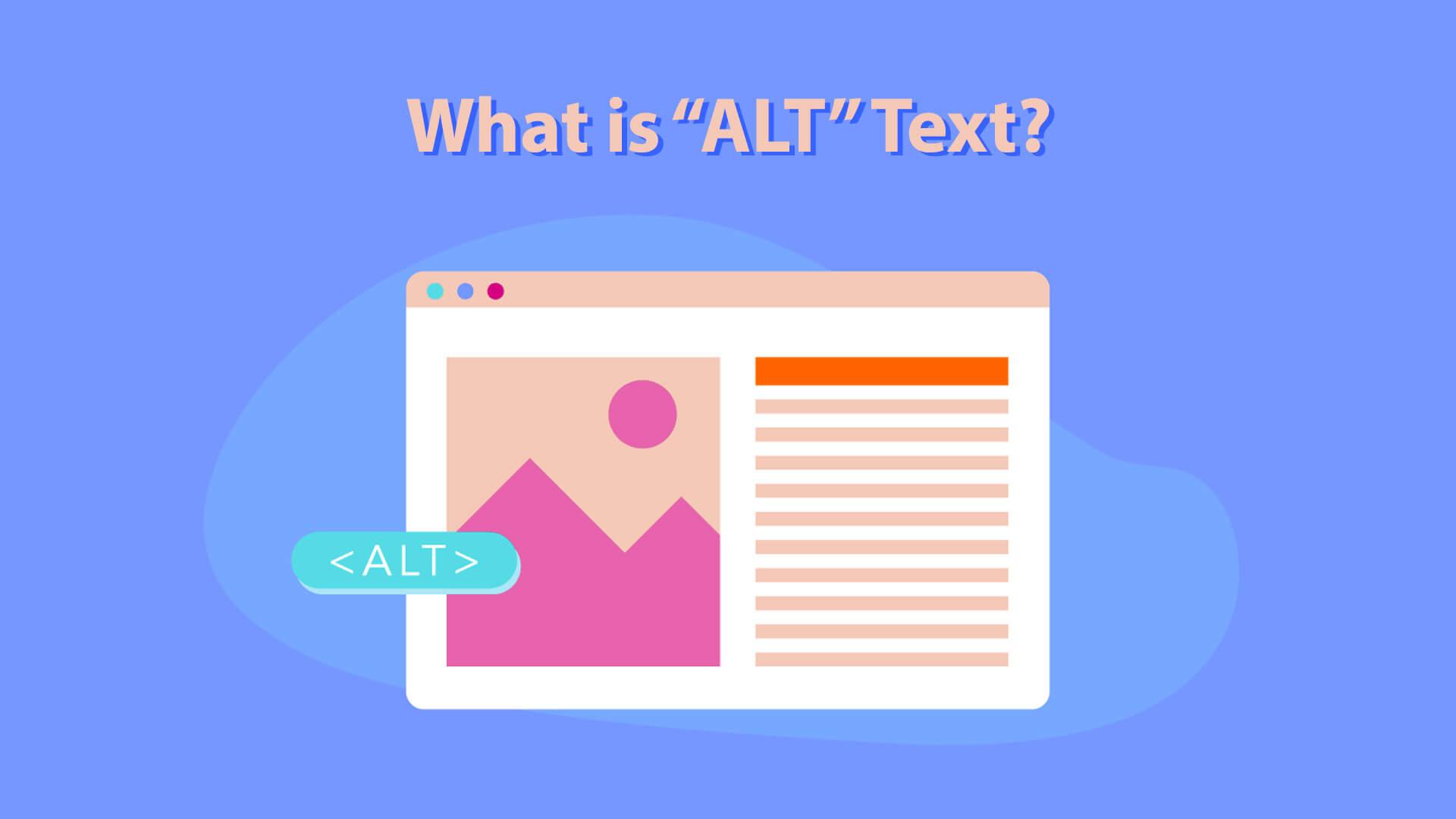
Using Alt Tags to Enhance Your Websites Accessibility
When it comes to making your website accessible, using alt tags is a crucial component that often gets overlooked. Alt tags, or alternative text descriptions, serve a vital purpose: they provide a textual alternative for images displayed on your website. This not only helps visually impaired users who rely on screen readers but also improves your site’s SEO. Here’s how you can make the most of them:
- Describe the Image Clearly: Your alt text should accurately reflect what’s in the image. Instead of using generic phrases like “image of a dog,” try “Golden Retriever playing in a park.” This gives users a clear understanding of the image’s context.
- Keep It Concise: Aim for around 125 characters or less. While you want to be descriptive, brevity ensures that screen readers can convey the information without overwhelming the user.
- Use Keywords Wisely: If appropriate, include relevant keywords to enhance SEO, but don’t stuff the alt text with them. The primary goal should always be to convey information.
- Avoid Redundancy: If the image is purely decorative and does not add meaning to the content, you can use an empty alt attribute (alt=””) to signal to screen readers that they can skip it.
Moreover, alt tags are not just beneficial for accessibility—they also play a role in helping search engines understand your content better. When search engines crawl your site, they can’t “see” images as humans do. Instead, they rely on alt text to comprehend what the image represents. This is particularly important for e-commerce sites where product images significantly impact user experience and conversion rates.
For instance, let’s consider a simple table that showcases the differences between effective and ineffective alt text:
| Effective Alt Text | Ineffective Alt Text |
|---|---|
| Aerial view of a bustling city skyline at sunset. | City skyline. |
| Close-up of ripe strawberries in a wooden basket. | Fruit. |
| An elderly woman reading a book in a cozy chair. | Old woman. |
By using effective alt text, you enhance user experience, improve accessibility, and bolster your website’s SEO ranking. So, take a moment to review your images and ensure they all have descriptive alt tags. It’s a small effort that can lead to significant benefits, making your content more inclusive and engaging.
Lastly, remember that alt tags should be part of your overall content strategy. Think of them as opportunities to connect with your audience. When you provide thoughtful, descriptive alt text, you’re not just following best practices; you’re also showing that you care about all visitors to your site, regardless of their abilities. This kind of empathy can significantly boost your brand’s image and foster loyalty among users.
Best Practices for Using Tags in Your Social Media Strategy
Using tags effectively in your social media strategy can significantly enhance your online visibility and engagement. Here are some best practices to make sure you are leveraging tags to their fullest potential:
- Be Relevant: Always choose tags that are directly related to your content. Irrelevant tags can mislead your audience and reduce trust.
- Research Popular Tags: Utilize tools like Hashtagify or RiteTag to discover trending tags in your niche. This can help you reach a broader audience.
- Mix General and Specific Tags: Combine widely-used tags with niche ones. While general tags can increase reach, specific tags attract targeted followers who are genuinely interested in your content.
- Limit Your Number: Using too many tags can clutter your posts. Aim for a balanced approach, typically between 5 to 10 strategically chosen tags.
- Monitor Performance: Keep track of which tags generate the most engagement. Social media platforms often provide analytics that can help you refine your strategy.
Moreover, ensure you engage with communities around the tags you use. This creates an organic growth cycle, where you not only use tags to gain visibility but also participate in conversations relevant to your brand.
| Tag Type | Purpose |
|---|---|
| General | To reach a wide audience. |
| Niche | To connect with a specific target audience. |
| Branded | To build brand identity and community. |
| Event | To join conversations about specific events or happenings. |
Lastly, don’t forget to create your own branded tags. This not only reinforces your identity but also allows you to compile user-generated content under a unique tag, promoting community and engagement around your brand.
By following these practices, you will not only enhance your visibility but also foster a more engaged and loyal audience. Tags are a powerful tool—use them wisely!
Avoiding Common Tagging Mistakes That Hurt Your Site
When it comes to optimizing your website, tags are more than just decorative elements; they play a crucial role in how search engines and users interact with your content. However, many website owners make common mistakes that can undermine their tagging efforts. Here’s how to steer clear of those pitfalls and ensure your tags work for you, not against you.
One of the most prevalent errors is the overuse of tags. Stuffing your content with keywords might seem like a good idea to boost visibility, but it can backfire. Instead of enhancing your SEO, search engines may penalize your site for keyword stuffing. Aim for a natural flow where tags complement the content rather than dominate it. A well-placed tag can make your content easier to read and more engaging.
Another mistake many make is neglecting to use meta tags effectively. Meta tags, such as the title tag and meta description, are essential for SEO. They provide search engines with context about your page and help improve click-through rates from search results. Ensure your title tags are unique and descriptive, while your meta descriptions should succinctly summarize the page’s content, enticing users to click.
| Tag Type | Best Practices |
|---|---|
| Title Tag | Keep it under 60 characters, include primary keywords |
| Meta Description | Between 150-160 characters, use active language |
| Header Tags (H1, H2) | Use only one H1 tag per page, structure content hierarchically |
Don’t forget about header tags. They help structure your content and improve readability. Each page should ideally have one H1 tag that clearly defines the main topic, followed by H2 and H3 tags that break down the content into digestible sections. This not only aids user experience but also helps search engines understand your content hierarchy.
Another common issue is using tags that are too generic. While it might be tempting to use broad keywords, being specific is key. Tailor your tags to reflect the unique aspects of your content. For instance, instead of using “shoes,” consider “eco-friendly running shoes” to target a more defined audience and improve your chances of ranking higher in search results.
Lastly, don’t overlook the importance of regularly updating your tags. As your content evolves, so should your tagging strategy. Review your tags periodically to ensure they still align with your content and are resonating with your audience. This proactive approach can help maintain your site’s relevance and visibility over time.

Tools and Resources for Tag Management and Optimization
When it comes to managing and optimizing website tags, having the right tools at your disposal can make all the difference. Here are some essential tools and resources that can help streamline your tag management process:
- Google Tag Manager: A free and powerful tool that allows you to manage all your website tags without modifying your code. Its user-friendly interface makes it easy to add, edit, and organize tags efficiently.
- Adobe Experience Platform Launch: Ideal for enterprise-level websites, this tool provides comprehensive tag management capabilities, allowing for seamless integration with Adobe’s suite of marketing tools.
- Tag Assistant: A Chrome extension that helps you troubleshoot and validate the implementation of Google tags on your site, ensuring everything is firing correctly.
- Segment: This customer data platform allows you to collect, standardize, and route your data to various tools, making tag management more streamlined and coherent.
In addition to these tools, various resources can enhance your tag management skills:
- Online Courses: Platforms like Coursera and Udemy offer courses specifically focused on tag management and optimization, which can help you hone your skills.
- Blogs and Webinars: Websites like Moz, HubSpot, and Google’s own Analytics Blog regularly publish articles and webinars that provide insights into best practices for tag management.
- Community Forums: Places like Stack Overflow and Reddit’s Web Analytics subreddit are great for getting advice from experienced professionals and troubleshooting common issues.
| Tool/Resource | Purpose | Price |
|---|---|---|
| Google Tag Manager | Tag management | Free |
| Adobe Experience Platform Launch | Enterprise tag management | Contact for pricing |
| Tag Assistant | Validation tool | Free |
| Segment | Data collection and routing | Contact for pricing |
While tools are essential, understanding how to leverage them effectively is equally crucial. Regularly reviewing tag performance, optimizing for speed, and ensuring compliance with privacy regulations are just a few best practices to keep in mind as you navigate the world of tag management.
Remember, the key to successful tag optimization lies not just in the tools you use, but also in how well you understand your audience and their needs. By continuously learning and adapting, you’ll ensure that your tag management efforts drive the best results for your website.
Measuring the Impact of Tags on Your Website’s Performance
Understanding how tags influence your website’s performance is crucial for maximizing your digital presence. Tags are essentially keywords or phrases that categorize content, and their proper implementation can significantly impact search engine optimization (SEO), user engagement, and even conversion rates.
When it comes to SEO, tags help search engines understand the context of your content. By using relevant and specific tags, you can enhance your website’s visibility. Search engines are more likely to rank your pages higher when they see well-structured tags that accurately represent the content. This leads to:
- Improved Organic Traffic: More visibility means attracting more visitors.
- Better User Experience: Users can easily find what they are looking for.
- Higher Engagement Rates: Relevant content keeps visitors on your site longer.
In addition to SEO benefits, tags play a vital role in user experience. They facilitate easier navigation throughout your site, allowing users to find related content quickly. This seamless browsing experience can lead to:
- Increased Page Views: Users are more likely to explore additional content.
- Lower Bounce Rates: Visitors who find relevant content are less likely to leave immediately.
- Enhanced Brand Perception: A well-organized site conveys professionalism.
To truly measure the impact of tags, tracking analytics is essential. You can use tools like Google Analytics to see how tagged content performs in terms of:
| Metric | Importance |
|---|---|
| Page Views | Indicates popularity of tagged content. |
| Average Time on Page | Shows visitor engagement with tagged articles. |
| Conversion Rates | Measures how effectively tags lead to desired actions. |
It’s also beneficial to regularly audit your tags. Outdated or irrelevant tags can clutter your site’s structure and confuse both users and search engines. Here are some strategies for effective tag auditing:
- Remove Redundant Tags: Eliminate duplicates or similar tags.
- Consolidate Tags: Merge tags that serve the same purpose.
- Update Tags: Regularly refresh tags to align with current trends.
the impact of tags on your website’s performance is multifaceted and significant. Tagging not only helps with SEO and user navigation but also provides valuable insights into your audience’s behavior. Prioritizing the strategy surrounding tags can lead to long-term benefits for your website’s overall effectiveness and success.

Keeping Your Tags Organized for Maximum Efficiency
When you’re managing a website, efficiently organizing your tags can be a game-changer. Tags not only help categorize your content but also enhance user experience and boost SEO. To get the most out of your tagging strategy, consider these essential tips:
- Be Descriptive: Choose tags that clearly describe your content. This helps both readers and search engines understand the context of your posts.
- Avoid Overlapping Tags: Each tag should serve a unique purpose. If two tags have similar meanings, it can create confusion. Aim for distinct categories.
- Limit the Number of Tags: Too many tags can dilute their effectiveness. Stick to a manageable number that accurately reflects your content without overwhelming visitors.
- Consistent Naming Convention: Use a consistent format for your tags. Whether you opt for singular vs. plural terms or camel case vs. hyphens, consistency is key.
To visualize how your tags are performing, consider setting up a simple tracking table. This can help you identify which tags are most effective at driving traffic and which might need to be re-evaluated.
| Tag | Post Count | Traffic (% of Total) |
|---|---|---|
| SEO | 10 | 25% |
| Content Marketing | 8 | 20% |
| Web Development | 15 | 30% |
| Social Media | 5 | 10% |
| Design | 6 | 15% |
Another effective strategy is to regularly review and clean up your tags. As your content evolves, some tags may become redundant or irrelevant. Periodically assess your tags and remove or merge those that are underperforming.
encourage user interaction by displaying a tag cloud. This visual representation allows visitors to quickly find topics of interest and can enhance their overall experience on your site. A well-organized tag system not only aids in navigation but also keeps your audience engaged, leading to higher retention and conversion rates.
Staying Updated: Evolving Trends in Website Tagging
In the ever-evolving digital landscape, website tagging has transformed significantly. As businesses strive to enhance user experience and improve analytical insights, staying on top of the latest tagging trends is crucial. From fundamental HTML tags to advanced JavaScript frameworks, understanding these changes can make a substantial difference in your website’s performance and SEO.
1. The Shift to Event Tracking
Gone are the days when website tagging was solely about tracking page views. Modern tagging strategies emphasize event tracking, allowing businesses to gain insights into user interactions that go beyond basic metrics. By tagging events like clicks, form submissions, and video views, you can understand how users engage with your content, leading to actionable insights.
2. The Rise of Automated Tag Management Systems
As websites grow more complex, manual tagging becomes cumbersome. This has led to the rise of automated tag management systems (TMS) such as Google Tag Manager. These tools simplify the process of adding and managing tags without requiring deep technical knowledge. With a TMS, you can:
- Quickly deploy new tags
- Maintain control over existing tags
- Test and troubleshoot tags efficiently
3. Data Privacy and Compliance
With increasing concerns about data privacy, tagging practices need to adapt accordingly. Compliance with regulations like GDPR and CCPA is not just a legal requirement but also a trust factor for users. Ensuring that your tags respect user consent and provide transparency about data collection can enhance your brand’s credibility. Consider implementing:
- Cookie consent banners
- Anonymization of IP addresses
- Clear data policies
4. The Importance of Cross-Platform Tagging
Users interact with brands across multiple platforms—desktop, mobile, and social media. As such, cross-platform tagging has become increasingly important. Ensuring that your tagging strategy is consistent across all platforms allows for comprehensive tracking and a unified view of user behavior. This approach aids in creating a seamless experience for users, regardless of where they engage with your brand.
5. Integration with AI and Machine Learning
Artificial intelligence and machine learning are reshaping the way we analyze data collected from website tags. By leveraging AI algorithms, businesses can identify patterns and predict user behavior more effectively. Future tagging trends will likely embrace these technologies, enabling you to personalize user experiences in real-time. Imagine tags that not only collect data but also suggest content based on user behavior!
Staying updated with these evolving trends not only enhances your tagging strategy but also positions your business for success in the digital arena. Embracing these advancements ensures that you are not just keeping pace with industry changes, but also setting a foundation for future growth.

Final Thoughts on Mastering Website Tags for Success
As you embark on the journey of mastering website tags, remember that these small snippets hold immense power. They are not just a line of code but a bridge connecting your content to the right audience. When used effectively, website tags can enhance your site’s visibility, improve SEO, and ultimately drive more traffic.
Consider the following key points to ensure you’re leveraging tags to their fullest potential:
- Relevance is Key: Always choose tags that accurately reflect the content of your page. Misleading tags can frustrate users and degrade your site’s credibility.
- Research and Analyze: Use tools like Google Trends and keyword planners to identify popular tags in your niche. Regularly update your tags based on performance data and emerging trends.
- Consistency Matters: Be consistent in your tagging strategy. This not only helps with organization but also improves user experience by guiding visitors seamlessly through related content.
- Limit Your Tags: While it might be tempting to add as many tags as possible, focus on quality over quantity. Too many tags can confuse search engines and dilute your content’s impact.
Incorporating well-thought-out tags into your website can create a more structured and navigable experience for your users. Not only do they help in organizing content, but they also play a crucial role in SEO strategies. The right tags can lead to better indexing by search engines and higher rankings in search results.
| Tag Type | Purpose | Best Practices |
|---|---|---|
| Title Tags | Defines the title of a webpage for search engines | Keep it under 60 characters |
| Meta Tags | Provide information about the webpage content | Use relevant keywords and a compelling description |
| Header Tags | Organizes content and improves readability | Use H1 for titles, H2 for subtitles, etc. |
Ultimately, mastering website tags requires a blend of creativity and analytical thinking. Regularly review and refine your tagging strategy to align with evolving SEO best practices and user expectations. This not only keeps your content fresh but also enhances its discoverability in an ever-competitive online landscape.
So, whether you are a seasoned web developer or just starting out, take the time to invest in your tagging strategy. The benefits will reflect in your website’s performance and user engagement, leading to long-term success.
Frequently Asked Questions (FAQ)
Q&A: What Are Website Tags? (And How to Use Them Properly)
Q: What exactly are website tags?
A: Great question! Website tags are snippets of code or keywords that are added to your web pages to help categorize content, improve SEO, and track performance. Think of them as labels that help both search engines and users understand what your content is all about.
Q: Why are website tags important?
A: Website tags are crucial for a few reasons. First, they help search engines index your site more effectively, which can improve your visibility in search results. Second, tags can enhance user experience by making it easier for visitors to navigate your content. Lastly, they can be extremely beneficial for tracking analytics, allowing you to see what content is performing well.
Q: Can you give me examples of different types of website tags?
A: Absolutely! Some common types of tags include title tags, meta tags, header tags (like H1, H2), and social media tags (like Open Graph tags). Each of these serves a unique purpose—title tags help with SEO, meta tags provide information about your page, header tags organize your content, and social media tags improve how your content appears when shared.
Q: How should I use tags effectively?
A: To use tags effectively, start by keeping them relevant and concise. Use keywords that accurately describe the content of the page. For example, your title tag should include primary keywords while also being enticing enough to encourage clicks. It’s also important to avoid over-tagging or keyword stuffing, as this can hurt your SEO rather than help it.
Q: Are there any mistakes I should avoid when using tags?
A: Definitely! One common mistake is neglecting to optimize title and meta tags. These are some of the first things users see in search results, so you want to make a great impression! Another mistake is not using header tags correctly; they help organize your content and improve readability. Lastly, be cautious about using duplicate tags across different pages—it can confuse search engines and dilute your SEO efforts.
Q: How often should I update my tags?
A: It’s a good practice to review and update your tags regularly, especially if you add new content or if your site undergoes a redesign. Also, keep an eye on performance metrics; if certain tags aren’t driving traffic, consider tweaking them or replacing them with more effective keywords.
Q: Can I implement tags myself, or do I need a developer?
A: Many website builders make it easy to add and manage tags yourself, so you may not need a developer. However, if you’re working with a more complex site or are unsure about how to implement tags correctly, consulting a developer can be a wise choice. They can ensure that your tags are set up properly and optimized for maximum effectiveness.
Q: Any final tips for using website tags?
A: Absolutely! Always prioritize user experience—tags should help your content shine, not complicate it. Stay up-to-date with SEO best practices and keep testing to see what works best for your audience. Lastly, don’t shy away from experimenting; sometimes the most unexpected strategies can lead to great results!
By using website tags properly, you can significantly boost your site’s visibility and enhance user experience. So go ahead and put these tips into action—you’ll see the difference!
In Retrospect
As we wrap up our deep dive into the world of website tags, it’s clear that these seemingly small elements hold significant power in shaping your online presence. From enhancing SEO to organizing your content and improving user experience, understanding how to use tags properly is crucial for anyone looking to make their mark on the web.
So, whether you’re a seasoned web pro or just dipping your toes into the digital waters, take the time to evaluate how you’re utilizing tags on your site. Remember, the right tags not only help search engines find and rank your content but also guide your visitors to exactly what they’re looking for.
Don’t underestimate the impact a well-structured tag system can have on your site’s performance. Get started today, experiment, and keep refining your strategy. Your website—and your audience—will thank you for it! Happy tagging!






