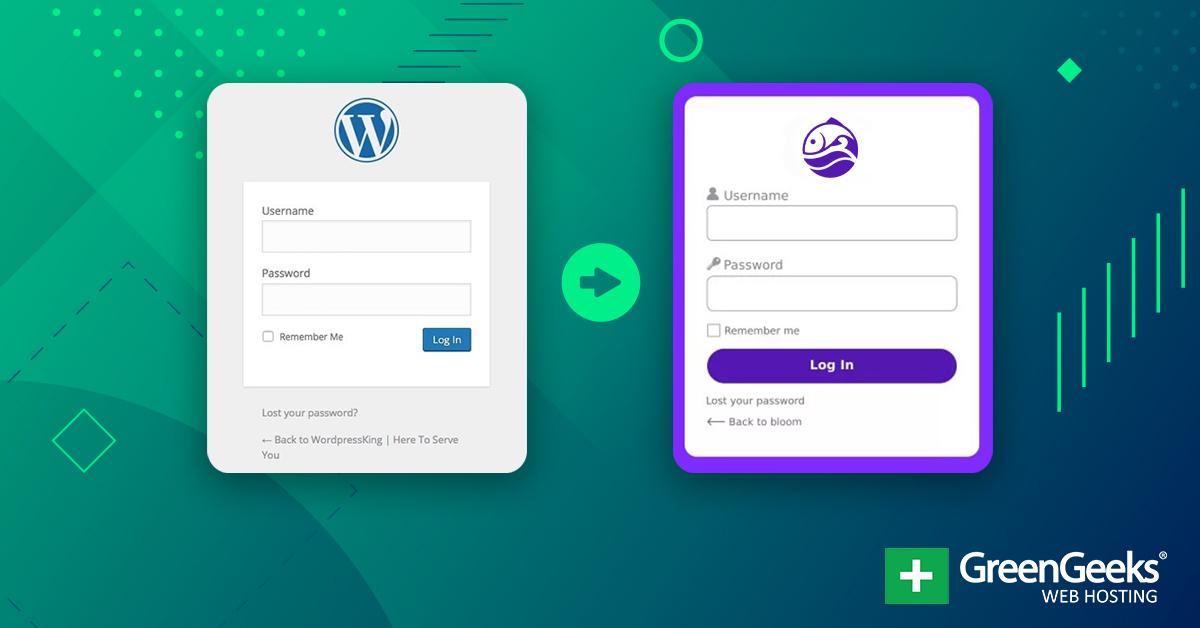
Are you tired of the standard WordPress login experience? You’re not alone! For many website owners, the login page can feel a bit bland and, let’s be honest, a little insecure. Thankfully, the right login plugin can transform your WordPress site’s security and user experience, making it not only safer but also more inviting for your visitors. In this article, we’re diving into the 6 best WordPress login plugins that can elevate your site – and the best part? Most of them are free! Whether you’re looking to enhance security, customize your login page, or streamline the user experience, we’ve got you covered. Stick around as we compare these plugins, highlight their key features, and help you find the perfect fit for your WordPress site. Let’s get started!
Understanding the Importance of Secure WordPress Logins
When it comes to securing your WordPress site, understanding the significance of a robust login process cannot be overstated. The login page is often the first and most vulnerable point of entry for unauthorized users, making it a prime target for hackers. A secure WordPress login not only protects your site from malicious attacks but also ensures that your valuable data remains safe from prying eyes.
Why is a Secure Login Crucial?
Here are some key reasons why having secure login practices is essential for your WordPress site:
Protection Against Brute Force Attacks: Many attackers use automated scripts to guess passwords. Secure logins can significantly mitigate the risk of such attacks.
Improved User Trust: Users are more likely to trust a site that demonstrates serious commitment to security, enhancing overall user experience.
Compliance with Legal Standards: Depending on your site’s nature, you may be obligated to comply with various data protection regulations, making security measures mandatory.
Choosing the right login plugin can make all the difference. With numerous options available, it’s vital to select a plugin that aligns with your security needs. Here are some key features to look for:
Two-Factor Authentication: This adds an extra layer of security by requiring a second form of identification, such as a text message code.
Login Attempt Monitoring: Keep track of failed login attempts to identify potential threats before they escalate.
IP Whitelisting: Allow access only from specific IP addresses to further tighten security.
Customizable Login URL: Changing the default login URL can keep potential hackers at bay.
Let’s take a look at a comparison of popular login plugins that can enhance the security of your WordPress site:
Plugin Name
Free Version
Two-Factor Authentication
Customizable URL
Wordfence
Yes
✔️
No
iThemes Security
Yes
✔️
✔️
WP Login Lockdown
Yes
No
No
Google Authenticator
Yes
✔️
No
Implementing even a few of these practices can drastically improve your site’s security posture. By understanding the importance of secure logins, you position your WordPress site as a safe space for your users and your content. Remember, in the digital landscape, prevention is always better than cure, especially when it comes to safeguarding your online presence.
Why Choose a Plugin for Your WordPress Login Needs
When it comes to securing and customizing your WordPress login experience, opting for a plugin can be one of the best decisions you make. Here’s why choosing a plugin tailored for your login needs can transform not just the way you access your site, but also enhance its overall security and user experience.
Enhanced Security Features
Security should be a top priority for any website owner, and login plugins often come loaded with features designed to protect you from unauthorized access. Common security enhancements include:
Two-Factor Authentication: Adds an additional layer of security by requiring a second form of verification.
Login Attempt Limits: Prevents brute-force attacks by limiting the number of login attempts.
IP Whitelisting: Allows you to define specific IP addresses that can access your login page.
Customizable User Experience
Login plugins offer a wealth of customization options that allow you to tailor the login process to fit your brand’s identity. You can:
Brand Your Login Page: Use logos, colors, and custom backgrounds to create a consistent look.
Modify Login Fields: Add or remove fields to streamline the process for your users.
Redirect Users: Send users to specific pages after login based on their roles.
Simple Setup and Maintenance
One of the significant advantages of using plugins is their ease of installation and setup. Most plugins can be activated with just a few clicks, and many come with intuitive interfaces that require little to no technical expertise to navigate. Plus, regular updates ensure your plugin stays compatible with the latest version of WordPress and includes any new security features.
Cost-Effective Solutions
Many of the best WordPress login plugins are available for free, offering an array of features that cater to the needs of most website owners. Even premium options are often reasonably priced, giving you access to advanced functionalities without breaking the bank. Investing in a plugin can save you time and money in the long run by preventing security breaches and improving user engagement.
Community Support and Documentation
By choosing a popular login plugin, you often gain access to a vast community of users and developers. This means you can find helpful resources such as:
Detailed Documentation: Step-by-step guides to assist you in getting the most out of the plugin.
User Forums: Opportunities to connect with other users to share tips and troubleshoot issues.
Regular Updates: Ongoing improvements and features based on user feedback.
investing in a specialized login plugin for your WordPress site not only enhances security but also elevates user experience and brand consistency. With the wide range of features available, you can choose a plugin that perfectly aligns with your needs—ensuring your website remains secure and user-friendly.
Key Features to Look for in a Login Plugin
When selecting a login plugin for your WordPress site, it’s essential to identify features that align with your specific needs. A good login plugin can significantly enhance user experience, security, and even site performance. Here are some key features to consider:
Customizable Login Forms: The ability to customize login forms can significantly improve branding. Look for plugins that allow you to change colors, logos, and layouts to match your website’s design.
Social Media Login: Integrating social media login options can streamline the process for users. They can bypass lengthy registration forms and log in quickly using their existing social accounts.
Two-Factor Authentication (2FA): Security is paramount. A plugin that offers 2FA adds an extra layer of protection, ensuring that only authorized users can access your site.
Login Redirects: Choose a plugin that allows you to set specific redirect URLs after login. This feature can guide users to the most relevant page, enhancing their experience.
Besides the above, it’s also crucial to consider the plugin’s performance and compatibility with your existing setup:
Lightweight and Fast: Ensure that the plugin is optimized for speed to prevent any lag in the login process. A sluggish login can deter users.
Compatibility with Page Builders: If you use page builders like Elementor or WPBakery, make sure the plugin seamlessly integrates with them for a cohesive user experience.
Regular Updates and Support: A reliable plugin is one that receives regular updates and has responsive support. This ensures that any issues are promptly addressed and security vulnerabilities are patched.
consider the plugin’s overall user feedback and documentation:
Plugin Name
User Ratings
Documentation
LoginPress
4.8/5
Comprehensive
WPForms
4.9/5
Extensive
WP Login Lockdown
4.6/5
Moderate
By evaluating these features, you can make an informed choice that not only meets your needs but also enhances the overall functionality of your WordPress site. A thoughtfully selected login plugin will pave the way for a smoother user journey and fortified security.
A Closer Look at the Top Free WordPress Login Plugins
When it comes to securing your WordPress site, the login process is often where the most vulnerabilities lie. Fortunately, there are several free plugins available that can enhance your login experience while bolstering security. Let’s dive into some of the top contenders and see how they can benefit your website.
Key Features to Consider
Before we compare specific plugins, it’s essential to know what features can make a significant difference in your login process. Here are some must-have features:
Two-Factor Authentication: Adds an extra layer of security by requiring a second form of verification.
Customizable Login Pages: Allows you to personalize your login page, which can enhance branding.
Brute Force Protection: Helps to prevent unauthorized access through repeated login attempts.
Login Lockdown: Temporarily blocks IPs after a set number of failed login attempts.
Social Login Options: Enables users to log in via social media accounts, simplifying the process.
Plugin Comparisons
Plugin Name
Key Features
Compatibility
WP 2FA
Two-Factor Authentication, User Role Management
All WP Versions
Custom Login Page Customizer
Customizable Login Forms, Preview Feature
All WP Versions
Limit Login Attempts Reloaded
Brute Force Protection, Login Lockdown
All WP Versions
Social Login
Social Media Login, Easy Integration
All WP Versions
In-Depth Plugin Insights
WP 2FA is an excellent choice for those who prioritize security. Offering robust two-factor authentication, it ensures that your site remains protected from unauthorized access. With its user role management feature, you can control who has access to sensitive areas of your site, making it perfect for team environments.
For a more visually appealing login experience, Custom Login Page Customizer stands out. It allows you to tailor your login page to reflect your brand’s identity, offering a seamless experience for users. The preview feature makes it easy to see changes in real time, ensuring you get the look just right.
If protection from brute force attacks is a concern, look no further than Limit Login Attempts Reloaded. This plugin secures your site by temporarily blocking IP addresses after a specified number of failed login attempts. It’s simple yet effective, providing peace of mind without complicated configurations.
Lastly, if you want to simplify the login process for your users, Social Login can be a game-changer. By enabling login through social media accounts, you can reduce friction and enhance user experience, likely leading to higher retention rates. It integrates smoothly with popular social platforms, making it a breeze to set up and use.
Plugin One: Features, Pros, and Cons
Plugin One is a popular choice among WordPress users looking to enhance their login experience. Its user-friendly interface and robust features make it a standout in the crowded plugin marketplace. Let’s dive into the specifics.
Features
Customizable Login Forms: Easily modify the appearance of your login form to match your website’s branding.
Social Login Options: Allow users to log in using their social media accounts, simplifying the process.
Two-Factor Authentication: Boost security by requiring a secondary verification step during login.
Brute Force Protection: Automatically detects and blocks suspicious login attempts to safeguard your site.
User Role Management: Control access permissions by assigning different role capabilities for various user types.
Pros
Ease of Use: The intuitive setup process makes it suitable for users of all skill levels.
Robust Security Features: With multiple layers of security, you can rest easy knowing your site is protected.
Responsive Support: The development team is known for their quick and helpful customer service.
Free Version Available: Get access to essential features without spending a dime.
Cons
Limited Features in Free Version: Some advanced functionalities are locked behind a paywall.
Potential for Conflicts: There may be compatibility issues with certain themes or other plugins.
Learning Curve for Advanced Options: While basic features are easy to use, some advanced settings might confuse novice users.
Comparison Table
Feature
Availability (Free/Paid)
User Rating
Customizable Login Forms
Free
4.7/5
Social Login Options
Paid
4.5/5
Two-Factor Authentication
Paid
4.8/5
Brute Force Protection
Free
4.6/5
Plugin One stands out as a versatile choice for WordPress users, combining security and customization. While it has its drawbacks, particularly with the limitations of its free version, the overall functionality it offers can be a game-changer for your site’s login experience.
Plugin Two: Features, Pros, and Cons
With a focus on enhancing user experience and improving security, this plugin packs a punch with several standout features. First and foremost, it offers two-factor authentication, which adds an extra layer of security to your login process. Users can choose between various authentication methods, including SMS and email verification, ensuring that only authorized individuals can access the site.
Another notable feature is the customizable login page. You can easily modify the design to match your site’s branding, making the login process seamless for users. This feature not only enhances aesthetics but also reinforces your brand’s identity.
Moreover, the plugin includes an option for login attempt limiting. This means that you can set a cap on the number of unsuccessful login attempts, drastically reducing the risk of brute-force attacks. By blocking further attempts after a specified number, you can safeguard your site against unauthorized access.
When it comes to user management, the plugin shines with its role-based access control. You can easily define what different user roles can and cannot do, providing you with granular control over your site’s security settings. This is particularly useful for larger teams or membership sites.
Pros
Cons
Highly secure with two-factor authentication
Advanced features may overwhelm beginners
Customizable login page for branding
Potentially conflicting with other plugins
Login attempt limiting reduces brute-force risk
Limited free version compared to premium
Role-based access control for user management
Setup may require technical knowledge
It’s also worth noting that while the plugin offers a robust suite of features, the learning curve can be a bit steep for those new to WordPress. The interface is user-friendly, but the sheer number of options might be daunting at first.
In terms of pricing, the basic version is free, which is great for small sites or personal blogs. However, the premium version—which unlocks all features—comes with a price tag that might not suit everyone’s budget. It’s important to weigh the benefits against the costs to see if it aligns with your needs.
this plugin strikes a balance between security and user experience. Its features are geared towards making your login process not just secure, but also pleasant for users, ensuring that you can focus on what really matters—growing your online presence.
Plugin Three: Features, Pros, and Cons
If you’re searching for a login plugin that enhances security while retaining user-friendliness, this plugin is a strong contender. Its suite of features is designed to cater to both novice users and seasoned developers. Let’s dive into what sets it apart.
Features
Two-Factor Authentication: Adds an extra layer of security by requiring a second form of identification.
Customizable Login Page: Easily modify the appearance to match your brand, ensuring a cohesive user experience.
Brute Force Protection: Protects your site from malicious login attempts with IP blocking and login attempt limits.
Social Login Options: Allows users to log in using their social media accounts, improving convenience and accessibility.
User Role Management: Tailor access levels for different user roles, enhancing security and control.
Pros
Enhanced Security: The two-factor authentication feature significantly reduces the risk of unauthorized access.
User-Friendly: The intuitive interface makes it easy for all users, regardless of technical expertise.
Active Support Community: An engaged community means you can find help and resources easily, even for advanced features.
Cons
Performance Impact: Some users have reported a slight slowdown in site performance due to the added security measures.
Complex Settings for Advanced Features: While basic features are easy to use, advanced settings may require a learning curve.
Limited Free Features: The free version offers solid security, but many premium features require a paid upgrade.
Feature Comparison
Feature
Included in Free Version?
Available in Premium Version?
Two-Factor Authentication
✔️
✔️
Customizable Login Page
❌
✔️
Brute Force Protection
✔️
✔️
Social Login Options
❌
✔️
User Role Management
❌
✔️
this plugin stands out for its balance of security and usability. Whether you’re a small business or a growing enterprise, the features offered can significantly enhance your login process. Just bear in mind the potential need for a premium upgrade to fully leverage its capabilities.
Plugin Four: Features, Pros, and Cons
Plugin Four stands out in the crowded marketplace of WordPress login plugins, offering a robust blend of features that cater to both novice and seasoned website owners. Its user-friendly interface ensures that even those with minimal technical skills can set it up and start benefiting immediately.
Features:
Customizable Login Forms: Tailor the appearance of your login forms to match your site’s branding.
Two-Factor Authentication: Adds an extra layer of security by requiring a secondary verification method.
Login Attempts Limiting: Prevents brute force attacks by limiting the number of login attempts.
Social Login Integration: Allows users to log in using their social media accounts, simplifying the process.
However, no plugin is without its downsides. Here are some pros and cons to consider:
Pros:
User-Friendly: Intuitive design that makes setup a breeze.
Comprehensive Security: Incorporates essential security features to safeguard user data.
Responsive Support: Access to a dedicated support team to assist with any issues.
Regular Updates: The plugin is continually updated to protect against new threats.
Cons:
Premium Features: Some advanced features are locked behind a paywall.
Learning Curve for Customization: While basic setup is easy, deeper customization can take time to master.
To give you a clearer picture of how Plugin Four stacks up against its competitors, here’s a quick comparison table:
Feature
Plugin Four
Competitor A
Competitor B
Customizable Forms
✔️
✔️
❌
Two-Factor Authentication
✔️
❌
✔️
Social Login
✔️
✔️
✔️
Security Updates
✔️
✔️
❌
Plugin Four offers a well-rounded package that combines essential security features with convenience, making it a compelling choice for anyone looking to enhance their WordPress login experience. Whether you’re a small business owner or managing a larger site, the benefits often outweigh the drawbacks, making it worth a closer look.
Plugin Five: Features, Pros, and Cons
Features
This plugin stands out in the crowded field of WordPress login solutions by offering a unique blend of security and user-friendly features. Some key highlights include:
Two-Factor Authentication: Adds an extra layer of security by requiring a second form of identification.
Customizable Login Pages: Tailor the login experience to match your website’s branding.
Brute Force Protection: Automatically blocks suspicious login attempts to safeguard your site.
Account Lockout Options: Temporarily locks accounts after several failed login attempts to prevent unauthorized access.
Pros
This plugin comes packed with advantages that make it a compelling choice for any WordPress site owner. Here are some notable pros:
User-Friendly Interface: The setup process is straightforward, making it accessible for users of all skill levels.
Comprehensive Security Features: Offers robust security measures that reduce the risk of hacking.
Responsive Support: Users report prompt and helpful responses from the support team, ensuring any issues are quickly addressed.
Regular Updates: The plugin receives frequent updates to enhance functionality and security, adapting to new threats.
Cons
While the plugin boasts impressive features, it’s essential to consider some of its drawbacks:
Premium Features Locked Behind a Paywall: To access advanced features, users may need to purchase a premium version.
Incompatibility with Some Themes: Users have reported occasional conflicts with specific themes, which may require additional troubleshooting.
Learning Curve for Advanced Features: While basic features are easy to navigate, some advanced settings can be overwhelming for beginners.
Conclusion
this plugin provides a solid balance of security and usability, making it a great option for those serious about protecting their WordPress site. However, potential users should weigh the pros and cons, particularly around the premium features, to determine if it aligns with their specific needs.
Plugin Six: Features, Pros, and Cons
When it comes to enhancing your WordPress login experience, Plugin Six stands out with its unique offerings. This plugin focuses on user-friendly features that not only streamline the login process but also improve security. Here’s a breakdown of its most notable features:
Customizable Login Page: You can tailor your login screen to match your website’s branding, making it visually appealing for users.
Two-Factor Authentication: An added layer of security that requires users to verify their identity through a secondary method.
IP Whitelisting: Control access by allowing specific IP addresses to bypass login restrictions.
Login Attempts Limiting: Protect your site from brute-force attacks by limiting the number of login attempts.
While the features are robust, it’s essential to weigh them against the pros and cons to determine if Plugin Six is the right fit for your needs.
Pros
Enhanced Security: With features like two-factor authentication and IP whitelisting, your WordPress site enjoys a significant boost in security.
User-Friendly Interface: The intuitive dashboard makes it easy for even beginners to set up and manage.
Customization Options: The ability to customize the login page allows for branding consistency across your site.
Active Support Community: Users benefit from a thriving community where they can seek advice and share experiences.
Cons
Complexity for Beginners: While the interface is user-friendly, some advanced features may overwhelm novice users.
Potential for Conflicts: As with many plugins, it may conflict with other security measures or plugins installed on your site.
Limited Free Features: The free version might lack some of the more advanced functionalities available in the premium version.
Feature
Free Version
Premium Version
Customizable Login Page
Yes
Yes
Two-Factor Authentication
No
Yes
IP Whitelisting
No
Yes
Login Attempts Limiting
Yes
Yes
Ultimately, Plugin Six makes a compelling case for those looking to enhance their WordPress login process. With a focus on security and customization, it caters to a wide array of users, from casual bloggers to large enterprises. Consider your specific needs and weigh the pros and cons before making a decision, and you may find that Plugin Six is the perfect solution to elevate your site’s security and user experience.
Comparing Usability and Performance Among the Best Plugins
When evaluating plugins for WordPress login functionality, two critical factors stand out: usability and performance. A plugin may offer robust features, but if it’s not user-friendly or significantly slows down your site, it may not be the ideal choice. Let’s break down these two essential aspects to understand which plugins deliver the best experience.
Usability can be defined by how easy it is for users, both administrators and visitors, to navigate and interact with the login process. Here’s what to consider:
Intuitive Interface: A plugin should have a clean, straightforward interface that doesn’t confuse users. Look for options that allow easy customization without requiring coding skills.
Mobile Responsiveness: In today’s mobile-first world, ensuring that the login page looks and functions perfectly on all devices is crucial.
Customizability: The ability to tailor the login experience—such as changing colors, logos, or fields—enhances brand consistency and user comfort.
On the performance side, the impact of a plugin on site speed cannot be overstated. A sluggish login process can deter users from accessing your site. Here’s how to assess performance:
Load Times: Measure how quickly the login page loads. Look for plugins that are optimized for speed and don’t add unnecessary bloat.
Server Resource Usage: Some plugins may consume more server resources than others. A lightweight plugin is preferable, especially for high-traffic websites.
Compatibility: Ensure that the plugin integrates well with your current theme and other plugins without causing conflicts that could slow down your site.
To provide a clearer picture, here’s a quick comparison table of selected plugins based on usability and performance:
Plugin Name
Usability Rating
Performance Rating
WPForms
⭐⭐⭐⭐⭐
⭐⭐⭐⭐
LoginPress
⭐⭐⭐⭐⭐
⭐⭐⭐⭐⭐
Theme My Login
⭐⭐⭐⭐
⭐⭐⭐⭐
Login Lockdown
⭐⭐⭐⭐
⭐⭐⭐⭐⭐
As you can see, while some plugins excel in usability, others stand out in performance. Your ideal choice may depend on whether you prioritize an exceptional user experience or optimized speed. Ultimately, the best plugin should strike a balance between these two elements to create a seamless login experience.
When testing various plugins, it’s wise to keep an eye on real-time metrics. Tools like GTmetrix or Google PageSpeed Insights can give you essential feedback on how different plugins affect your site’s overall performance. Remember, a plugin that enhances usability but hinders performance can lead to increased bounce rates and decreased user satisfaction.
How to Choose the Right Plugin for Your Website
Choosing the right plugin for your WordPress site can feel overwhelming, especially with the plethora of options available. To simplify your decision-making process, consider the following factors:
Functionality: Ensure the plugin serves a specific purpose that aligns with your website’s needs. For instance, if you’re looking to enhance security, a login plugin with features like two-factor authentication is essential.
User Reviews: Take a moment to read user reviews and ratings. This can provide valuable insights into the plugin’s reliability and effectiveness.
Compatibility: Check if the plugin is compatible with your current WordPress version and theme. Incompatibility can lead to performance issues or website crashes.
Support and Updates: A plugin that is regularly updated and has active support can save you headaches down the line. Frequent updates typically mean the developers are addressing bugs and security vulnerabilities.
Next, consider the plugin’s ease of use. A user-friendly interface can save you time and frustration. You want a plugin that allows for quick setup and seamless integration into your existing workflow. If you find yourself spending more time figuring out how to use a plugin than actually benefiting from it, it might be time to reconsider your choice.
Performance is another crucial aspect. Some plugins can slow down your website, negatively affecting user experience and SEO. Look for plugins that are optimized for speed. You can often find performance metrics in user reviews or by using tools like GTmetrix after installation.
To help you in your selection, here’s a brief comparison of some popular WordPress login plugins:
Plugin
Key Feature
Price
WPForms
Drag & Drop Form Builder
Free & Paid Plans
LoginPress
Customizable Login Page
Free & Paid Plans
WPShield
Brute Force Protection
Free
Two Factor Authentication
Enhanced Security
Free
don’t forget to consider the cost. Many quality plugins offer free versions with essential features, while premium versions unlock advanced capabilities. Assess your needs carefully—investing in a premium plugin can be worthwhile if it significantly enhances your website’s performance and security.
Tips for Enhancing Security Beyond Plugins
While plugins can significantly enhance your WordPress security, relying solely on them isn’t enough. Here are some practical strategies to further fortify your website’s defenses:
Utilize Strong Passwords: Always choose complex passwords that combine letters, numbers, and symbols. Avoid common phrases and consider using a password manager to maintain unique credentials for different accounts.
Implement Two-Factor Authentication (2FA): Adding an extra layer of security through 2FA significantly reduces the risk of unauthorized access. Encourage all users to enable this on their accounts.
Regular Backups: Schedule automatic backups of your website. In the event of a breach, having a recent backup can save you from hours of work and potential data loss.
Keep WordPress and Themes Updated: Ensure that your WordPress core, themes, and all plugins are always up to date to protect against vulnerabilities. Set reminders or enable automatic updates where possible.
Limit Login Attempts: Prevent brute force attacks by limiting the number of failed login attempts. This can deter attackers who are trying to guess passwords through repeated attempts.
Use HTTPS: Ensure your website is secure by using HTTPS instead of HTTP. This encryption protects data transferred between your visitors and your site, enhancing trust and security.
Monitor Your Site Regularly: Regularly check your website for suspicious activity. Use security tools that can alert you to potential threats or unauthorized changes to your content.
Modify Your Login URL: Changing the default login URL can help prevent bot attacks. By obscuring the login page, you can significantly reduce the number of attempted breaches.
Remember, a multi-layered security approach is essential. Combining best practices with the right plugins will lead to a more robust defense and a safer online presence.
Final Thoughts on Streamlining Your WordPress Login Experience
Streamlining your WordPress login experience is an essential step towards enhancing both security and usability. As you consider the plugins mentioned in this comparison, it’s important to choose one that aligns not only with your website’s needs but also with your personal preferences. Each plugin offers unique features, so understanding what makes them stand out can help you make an informed decision.
When selecting a plugin, consider the following factors:
Security Features: Look for plugins that offer two-factor authentication, CAPTCHA, or IP whitelisting to safeguard against unauthorized access.
User Experience: A user-friendly interface can significantly improve the login experience for your site visitors. Choose plugins that offer a clean, intuitive design.
Customization Options: The ability to tailor your login page to match your branding can enhance your site’s professionalism. Opt for plugins that allow easy customization.
In comparing the plugins, several standout features might influence your choice:
Plugin Name
Key Feature
Price
WPForms
Customizable Login Form
Free / Premium
LoginPress
Custom Login Styles
Free / Premium
WP Limit Login Attempts
Brute Force Protection
Free
Two Factor Authentication
Enhanced Security
Free
Another important consideration is how well the plugin integrates with other tools you may be using. A seamless integration can save you time and effort while providing a cohesive experience across your website. Test the compatibility of your chosen plugin with existing themes and plugins to avoid conflicts.
Lastly, don’t forget to check user reviews and support options. A plugin with a strong community or solid customer support can make a world of difference when you encounter issues or have questions. Look for:
User Feedback: High ratings and positive testimonials can indicate a reliable plugin.
Support Availability: Access to documentation, forums, or direct support can help you navigate challenges effectively.
the right login plugin can significantly enhance your WordPress site’s security and user engagement. By carefully weighing the features, compatibility, and support options of each plugin, you can streamline your login experience and create a safer, more user-friendly environment for your site visitors.
Frequently Asked Questions (FAQ)
Q&A: 6 Best WordPress Login Plugins Compared (Most are Free)
Q1: Why should I consider using a WordPress login plugin?
A1: Great question! Using a WordPress login plugin can significantly enhance your site’s security and user experience. These plugins often provide features like two-factor authentication, login limits, and user-friendly custom login forms. Ultimately, they help protect your site from unauthorized access while making it easier for your users to log in.
Q2: Are all WordPress login plugins free?
A2: Most of the plugins we’ve compared are indeed free or have free versions with basic functionality. However, some offer premium features that can be unlocked with a paid version. It’s worth checking out the free options first to see if they meet your needs!
Q3: What are some key features I should look for in a login plugin?
A3: Look for features like:
Two-factor authentication: Adds an extra layer of security.
Brute force attack prevention: Limits login attempts to thwart hackers.
Customizable login forms: Personalizes the user experience.
Social login options: Allows users to log in using their social media accounts, making the process faster and easier.
Q4: Can you recommend a couple of plugins from your list?
A4: Certainly! One standout is WP Login Lockdown for its robust security features, perfect for anyone concerned about brute force attacks. Another great option is Theme My Login, which allows for easy customization of the login page to match your site’s branding and aesthetic.
Q5: What if I don’t have technical skills? Will I be able to set these plugins up?
A5: Absolutely! Most WordPress login plugins are designed with user-friendliness in mind. They typically come with clear instructions and intuitive interfaces. Even if you’re a beginner, you should be able to set them up without a hitch.
Q6: How do I choose the best plugin for my needs?
A6: Start by assessing what you need most. If security is your top concern, prioritize plugins with strong security features. If you’re focused on user experience, look for those that offer customizable login options. Reading user reviews and comparing functionalities can also help you make an informed decision!
Q7: Can these plugins affect my site’s performance?
A7: Generally, high-quality plugins should have minimal impact on your site’s performance. However, it’s always good practice to ensure that your site’s hosting environment is optimized and to limit the number of plugins you use to avoid conflicts or slowdowns.
Q8: Where can I find these plugins?
A8: You can find these plugins directly through the WordPress Plugin Directory, accessible from your WordPress dashboard. Just go to “Plugins” > “Add New” and search for the plugin names you’re interested in. Easy peasy!
Q9: Is there ongoing support for these plugins?
A9: Many of these plugins have active communities and support systems in place. Check the plugin’s page in the WordPress Plugin Directory for support options, documentation, and user forums. This way, you’ll be covered if you run into any issues!
Q10: Is it really worth investing time into finding the right plugin?
A10: Absolutely! Investing time in finding the right login plugin can save you from potential headaches in the future, like security breaches or poor user experiences. It’s a small effort that can lead to significant benefits for both you and your site visitors. Don’t miss out on making your WordPress site the best it can be!
The Way Forward
Wrapping It Up: Choose the Right WordPress Login Plugin for You!
And there you have it! We’ve walked through the six best WordPress login plugins that can elevate your site’s security, streamline your login process, and enhance user experience—many of which won’t cost you a dime!
Choosing the right plugin might feel overwhelming with so many options at your fingertips, but remember, the best choice will align with your site’s specific needs and your vision for user engagement. Whether you’re looking for something simple and straightforward or a feature-packed solution, there’s a plugin on this list that’s just right for you.
So, why wait? Dive in, give one (or more) of these plugins a try, and see the difference they can make for your site. Your users will appreciate the streamlined login experience, and you’ll have peace of mind knowing that your WordPress site is more secure.
Don’t forget to share your experiences in the comments below! Have a favorite plugin we didn’t mention? We’d love to hear about it. Happy blogging, and may your login process be seamless!