Hey there, digital trailblazers! If you’ve ever wondered why some websites effortlessly climb to the top of search engine results while others seem to vanish into the abyss, you’re in the right place. The secret sauce? It all boils down to website architecture. Think of your website as a powerful skyscraper; without a strong foundation and a well-organized layout, it’s destined to wobble—or worse, collapse—under pressure.
In this article, we’re going to unpack 13 proven tips to fine-tune your website architecture for SEO success. From intuitive navigation to smart internal linking strategies, we’ll walk you through practical examples that will help elevate your site’s visibility and user experience. Ready to transform your website into a search engine magnet? Let’s dive in!
Understanding the Basics of Website Architecture for SEO
Website architecture refers to how your site is structured and organized. This organization plays a crucial role in search engine optimization (SEO) because it helps search engines crawl and index your site effectively. A well-planned architecture can enhance user experience, reduce bounce rates, and ultimately drive more traffic to your site.
At its core, website architecture should be simple and logical. Here are some key elements to consider:
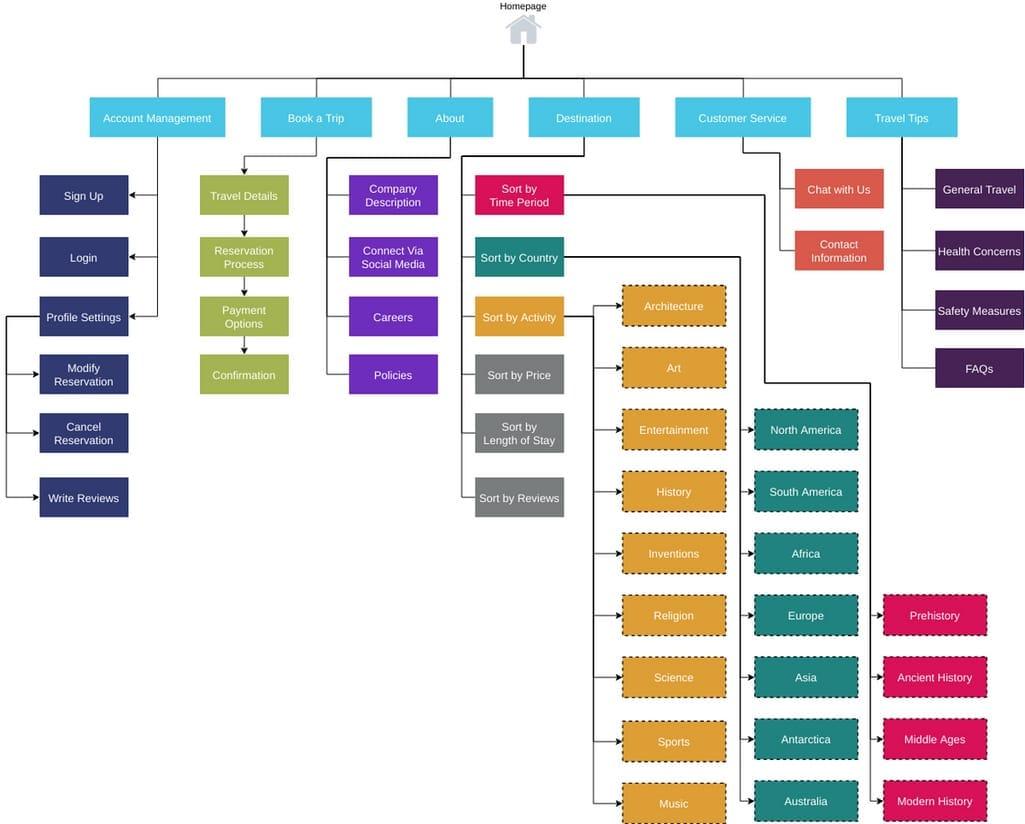
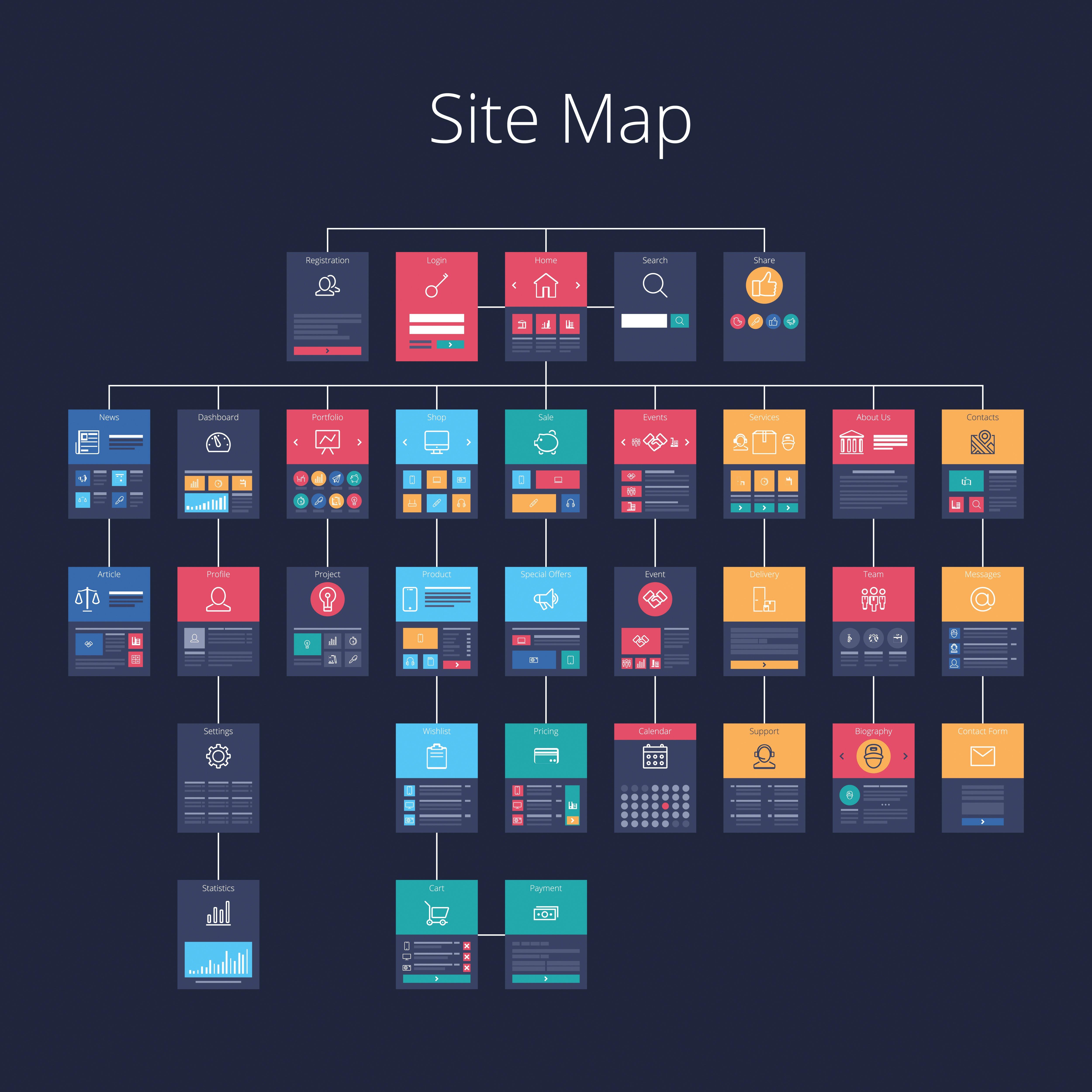
Hierarchy: Organize your content in a clear hierarchy. Use categories and subcategories to help guide users and search engines through your site.
Navigation: Ensure that your navigation is intuitive. A user should be able to find information with minimal clicks.
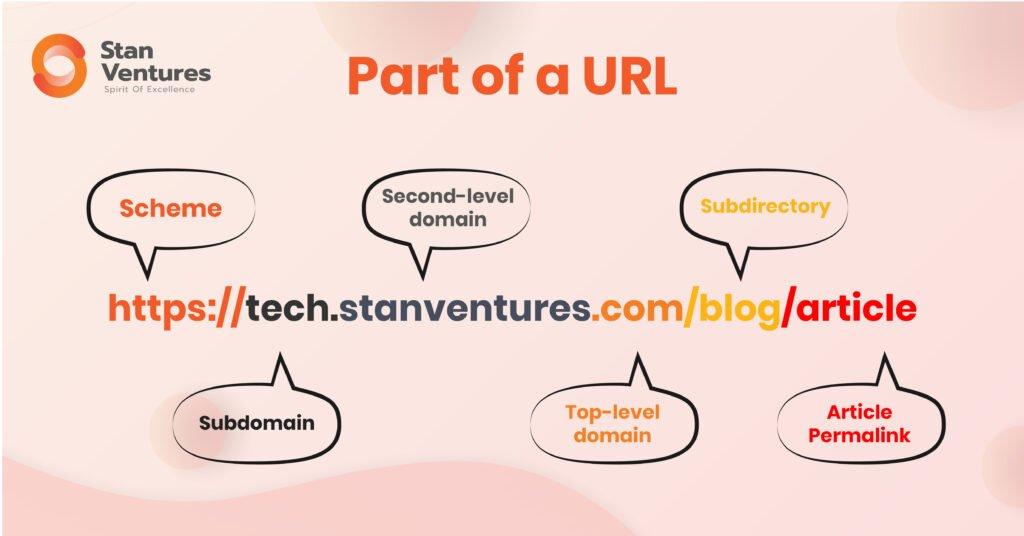
URL Structure: Create clean, descriptive URLs that reflect your site’s hierarchy. This helps both users and search engines understand the context of the pages.
Another important aspect is the use of internal linking. By linking to other relevant pages within your site, you help search engines discover new content while also improving user experience. Here are some best practices for internal linking:
Use descriptive anchor text: This informs users and search engines about the destination page.
Link to high-priority pages: Give more visibility to your most important content.
In terms of technical SEO, ensure your website is mobile-friendly and loads quickly. Google prioritizes sites that perform well on mobile devices, so consider implementing responsive design. You can use tools like Google PageSpeed Insights to evaluate your site’s performance.
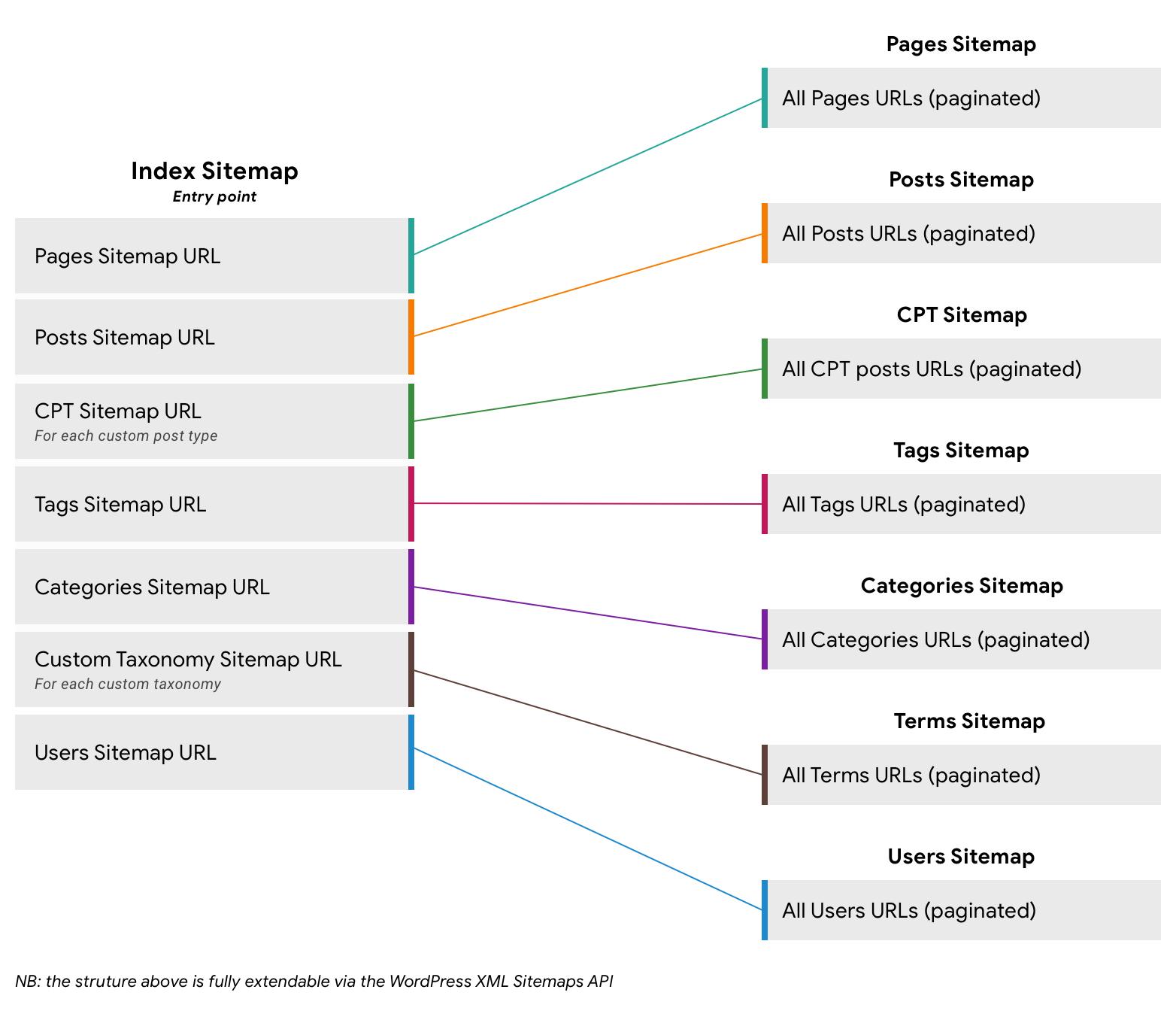
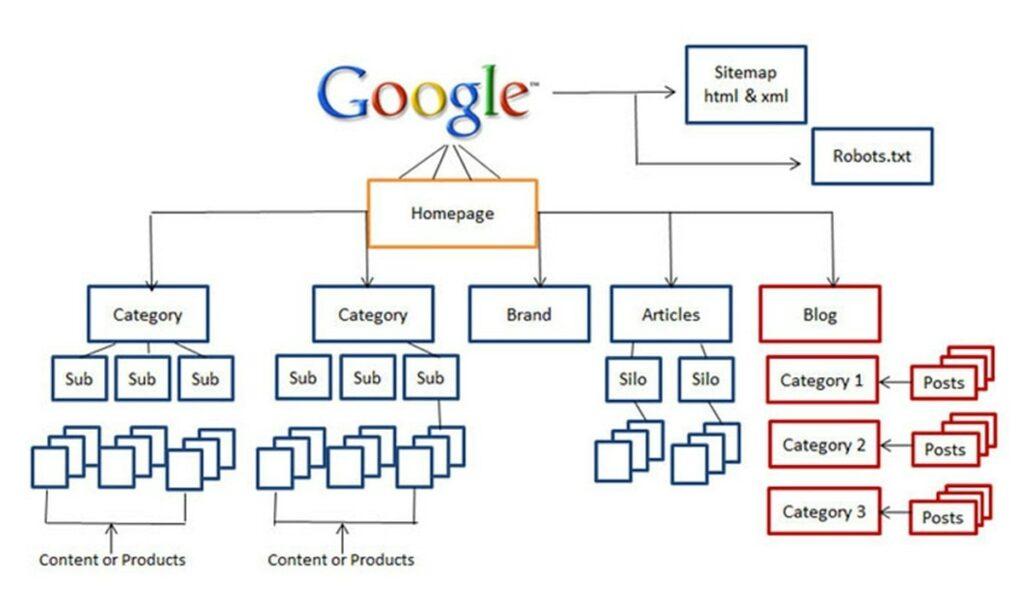
Another key component of website architecture is the sitemap. A well-structured sitemap helps search engines find and index your pages more efficiently. Make sure to submit your sitemap to Google Search Console so that it can be crawled regularly.
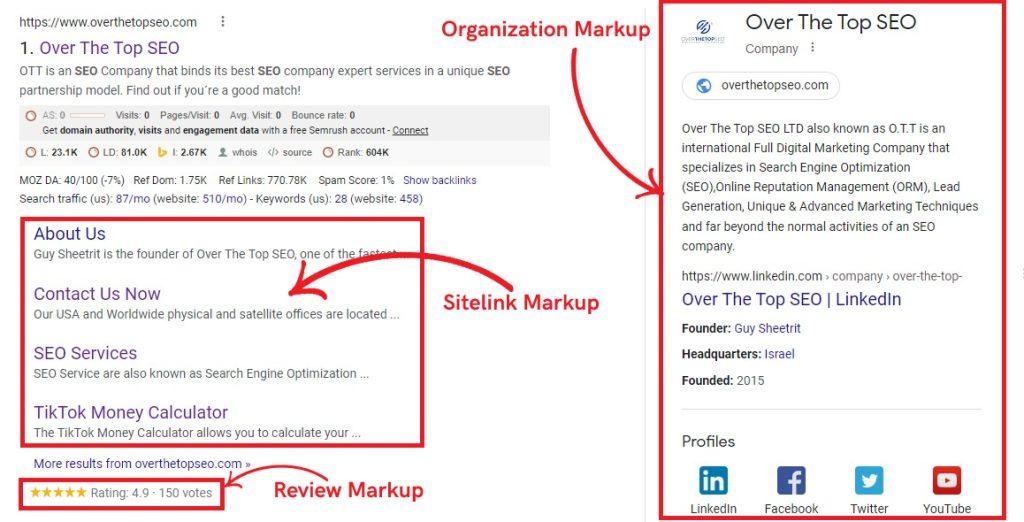
Lastly, don’t underestimate the power of schema markup. By adding structured data to your web pages, you provide additional context to search engines about your content. This can improve your visibility in search results by enhancing rich snippets.
Consider the following table that outlines the main elements of effective website architecture:
Element
Description
SEO Impact
Hierarchy
Logical structure of content
Improves crawlability
Navigation
Intuitive links to content
Enhances user experience
URL Structure
Descriptive, clean URLs
Helps in search ranking
Internal Linking
Links to related content
Boosts page authority
Sitemap
Organized list of pages
Aids in indexing
Schema Markup
Structured data for content
Improves visibility
By focusing on these elements, you can build a website architecture that not only supports your SEO goals but also enhances the overall user experience. Remember, a well-structured website is essential for both attracting visitors and maintaining their engagement.
The Importance of a Well-Structured Website
A well-structured website is like a well-organized library. When users and search engines can navigate it easily, they find what they’re looking for quickly. This is crucial not just for enhancing user experience but also for improving your site’s SEO. When your website’s architecture is optimized, search engines can crawl your pages more efficiently, which often leads to better rankings.
Here are some key aspects that illustrate the importance of having a structured website:
User Experience: A clear hierarchy and intuitive navigation keep visitors engaged. If users can find information without frustration, they’re more likely to stay longer and explore.
Crawl Efficiency: Search engines use bots to crawl sites. A logical structure means these bots can index your pages accurately, making it easier for your content to appear in search results.
Reduced Bounce Rate: When users can effortlessly locate what they need, they’re less likely to leave your site immediately. A well-structured site can dramatically lower bounce rates.
Content Prioritization: A good structure allows you to highlight your most important content. This can be achieved through strategic placement and linking, guiding both users and search engines to your key pages.
Consider this simple table that outlines the relationship between website structure and SEO benefits:
Website Structure Component
SEO Benefit
Clear Navigation Menu
Improved user engagement
Logical URL Structure
Enhanced crawlability
Internal Linking
Boosted page authority
Sitemap
Faster indexing
Furthermore, when structuring your website, don’t overlook the importance of mobile optimization. With a growing number of users accessing websites via smartphones, ensuring that your structure is responsive can significantly impact your site’s performance in search rankings. Google prioritizes mobile-friendly sites, so this is not just an option; it’s a necessity.
Lastly, consider the role of content categorization. By organizing your content into relevant categories and subcategories, you can create a logical flow that guides visitors through their journey on your site. This also helps in establishing topical authority, which can further enhance your SEO efforts.
Key Elements of Effective Website Architecture
Creating an effective website architecture is crucial for optimizing user experience and enhancing SEO performance. A well-structured site not only helps visitors navigate easily but also allows search engines to crawl and index your content efficiently. Here are some key elements to consider:
Hierarchy: Establish a clear hierarchical structure starting from the homepage down to subcategories and individual pages. This makes it easier for users and search engines to understand the relationship between different parts of your site.
URL Structure: Use a logical and descriptive URL structure that reflects your page’s content. For example, www.example.com/category/subcategory/page is more SEO-friendly than www.example.com/12345.
Internal Linking: Encourage deeper site exploration by using internal links. By linking relevant pages, you not only improve user experience but also help search engines discover more content on your site.
Mobile Optimization: Given the increasing number of mobile users, ensure your website is responsive. A mobile-optimized site reduces bounce rates and improves engagement metrics, which are crucial for SEO.
Another important aspect of website architecture is the use of XML sitemaps. These sitemaps serve as a roadmap for search engines, listing all pages on your site and how often they are updated. By keeping your sitemap current, you can ensure that search engines can easily find and index your content.
Additionally, focusing on load speed is essential. A fast-loading site enhances user experience and reduces abandonment rates. Consider optimizing images, utilizing browser caching, and minimizing server response times to improve performance.
Let’s not overlook the significance of content organization. Group related content together and use categories and tags effectively. This not only helps users find information quickly but also signals to search engines about the relevance of your content.
Element
Importance
Hierarchy
Guides user navigation and search engine understanding
URL Structure
Enhances SEO and user comprehension
Internal Linking
Boosts page authority and user engagement
Mobile Optimization
Improves user retention and SEO ranking
Load Speed
Reduces bounce rate and enhances user satisfaction
Content Organization
Facilitates user navigation and content discoverability
Lastly, don’t forget about user feedback. Regularly analyze user interactions and feedback to identify areas for improvement within your architecture. This continuous improvement process will not only enhance user satisfaction but also align with SEO best practices, ensuring your site stays competitive.
How to Create a User-Friendly Navigation System
Creating a user-friendly navigation system is essential for enhancing user experience and boosting your website’s SEO. A well-structured navigation allows visitors to find the information they need quickly, reducing bounce rates and increasing engagement. Here are some key elements to consider when designing your navigation:
Prioritize Simplicity: Keep your navigation menu straightforward. Limit the number of top-level items to no more than five or seven. This helps users make decisions quickly and easily.
Use Descriptive Labels: Each menu item should have clear, descriptive labels. Instead of vague terms like “Products,” opt for specific ones like “Men’s Clothing” or “Electronics.” This clarity helps users know exactly what to expect.
Hierarchy is Key: Organize your content in a hierarchical manner. Use dropdown menus to categorize sub-pages under main sections. This keeps the navigation clean and intuitive.
Incorporate Breadcrumbs: Breadcrumb navigation shows users their location within the site hierarchy. This not only improves usability but also aids search engines in understanding your site structure.
Another important aspect of a user-friendly navigation system is ensuring it’s accessible across all devices. With mobile traffic on the rise, responsive design should be a priority:
Responsive Menus: Ensure your navigation menu is mobile-friendly. Use collapsible formats or hamburger menus to save space without sacrificing functionality.
Touch-Friendly Elements: For mobile users, make buttons and links large enough to tap easily. A good rule of thumb is to make touch targets at least 44×44 pixels.
To further enhance your navigation, consider conducting user testing to gather valuable feedback. Observing real users can highlight unexpected pain points and areas for improvement. Utilize analytics tools to track user behavior, identifying which paths are most common and where users might be getting stuck.
Lastly, remember to optimize your navigation for search engines. Use relevant keywords in your menu labels and internal links, as this can significantly influence your SEO rankings. Ensure that all navigation links are crawlable by search engines to enhance discoverability.
Navigation Element
Benefit
Simple Menus
Faster decision-making for users
Descriptive Labels
Enhanced clarity and expectation
Breadcrumbs
Improved user location awareness
Responsive Design
Better experience on mobile devices
By implementing these strategies, you’ll create a navigation system that not only aids users in finding their way around your website but also enhances your overall SEO performance. Invest the time in crafting a thoughtful navigation system, and you’ll see the positive impacts on your site’s usability and search rankings.
Leveraging Internal Links for Enhanced SEO
One of the most powerful yet often overlooked strategies to boost your SEO is leveraging internal links. These links not only enhance user navigation but also help search engines understand the structure and hierarchy of your website. When done correctly, a solid internal linking strategy can significantly improve your site’s visibility and ranking.
Why Internal Links Matter
Internal links create pathways for users to explore related content on your site, leading to longer session durations and lower bounce rates. This user engagement signals to search engines that your content is valuable, further improving your SEO ranking. Here are some key benefits:
Improved Crawlability: Search engines use internal links to crawl your site more effectively, ensuring that all your pages are indexed.
Enhanced User Experience: Well-structured internal links guide visitors to relevant content, making their navigation seamless.
Page Authority Distribution: Internal links help distribute page authority across your site, particularly benefiting newer or less popular pages.
Best Practices for Internal Linking
To maximize the effectiveness of your internal links, consider the following practices:
Use Descriptive Anchor Text: Instead of generic phrases like “click here,” use keyword-rich anchor text that accurately describes the linked page.
Link to Relevant Content: Ensure that the pages you link to are related in topic and context to provide real value to your readers.
Avoid Overlinking: Too many internal links on a single page can dilute their value. Focus on quality over quantity.
By strategically placing these links, you not only provide additional resources for your customers but also enhance your SEO strategy, making it easier for search engines to recognize the interconnectedness of your content.
Monitoring and Adjusting Your Internal Links
Regularly review your internal linking strategy. Use analytics tools to track user behavior and identify which links drive the most traffic. Adjust your strategy accordingly to focus on high-performing links and refresh or remove underperforming ones. This ongoing optimization ensures that your internal linking remains effective and aligned with your content goals.
Creating an effective URL structure is one of the cornerstones of robust website architecture that enhances SEO. A well-optimized URL not only helps search engines understand the content of your pages but also provides a better user experience. Here are some key strategies to consider when optimizing your URLs:
Keep it Simple: Shorter URLs are easier to read and remember. Aim to keep your URLs under 60 characters whenever possible.
Use Relevant Keywords: Incorporate keywords that reflect the page’s content. This practice signals to search engines what the page is about.
Avoid Special Characters: Stick to alphanumeric characters and hyphens. Special characters can confuse both users and search engines.
Utilize Hyphens for Separation: Use hyphens (-) instead of underscores (_) to separate words in your URLs. Search engines recognize hyphens better.
Another important aspect of URL optimization is maintaining a logical hierarchy. This means structuring your URLs in a way that reflects the organization of your content. For example, a well-structured URL might look like this:
URL Structure
Meaning
www.example.com/category/product
Indicates a product within a specific category.
www.example.com/blog/post-title
Shows a blog post under the main blog section.
Besides keyword relevance and simplicity, using canonical tags can help manage duplicate content issues in your URLs. This practice ensures that search engines know which version of a URL to prioritize, thereby consolidating your SEO value. Implementing canonical tags can significantly enhance your visibility in search results.
Redirects: Use 301 redirects wisely to guide users and search engines to the correct pages, especially if URLs have changed over time.
HTTPS Protocol: Secure your site with HTTPS. It’s not only a ranking factor but also builds trust with users.
Consistent Structure: Maintain a consistent URL structure throughout your site to avoid confusion and improve indexing.
Lastly, monitor your URLs regularly for any broken links or issues. Tools like Google Search Console can help you identify problematic URLs that might affect your site’s performance. By paying attention to these details, you’ll set a solid foundation for your website’s SEO journey, making it easier for users and search engines to navigate and appreciate your content.
The Role of Sitemaps in SEO Performance
Sitemaps serve as a roadmap for search engines, guiding them through the various pages of your website. By providing a clear structure, sitemaps help ensure that all of your content is indexed efficiently, enhancing your site’s visibility in search results. When search engines can easily navigate your website, they are more likely to understand its context and relevance, which can significantly boost your SEO performance.
There are two main types of sitemaps: HTML sitemaps and XML sitemaps. Each serves a distinct purpose:
HTML Sitemaps: Designed for users, these sitemaps help visitors quickly find information on your site. They can improve user experience by simplifying navigation.
XML Sitemaps: Primarily for search engines, XML sitemaps list URLs along with metadata like how often the page is updated and its importance relative to other pages on the site.
Implementing an XML sitemap can dramatically enhance your site’s crawlability. This is especially crucial for larger websites with numerous pages. By submitting your XML sitemap to Google Search Console, you’re proactively helping search engines discover your content without relying solely on links. This can be particularly beneficial for new pages or updates that might take time to get noticed through traditional crawling methods.
Including a sitemap can also lead to improved indexing times. When search engines find a comprehensive sitemap, they can quickly identify new content or changes, ensuring that your most relevant pages are indexed faster. This is essential for time-sensitive content like blog posts or promotional pages that rely on timely visibility.
Moreover, a well-structured sitemap can provide valuable insights into your website’s architecture. It allows you to see how your pages interlink and where potential gaps in your content might exist. You can use this information to enhance your internal linking strategy, bolstering the SEO performance of your entire site.
To maximize the effectiveness of your sitemap, consider the following best practices:
Keep your sitemap updated regularly to reflect new content.
Limit the number of URLs in a sitemap to 50,000 for optimal performance.
Use descriptive titles and organize pages logically.
don’t forget to monitor your sitemap’s performance through analytics tools. Understanding how search engines interact with your sitemap can lead to ongoing improvements and help you stay ahead of the competition. By leveraging the power of sitemaps, you set a solid foundation for your website’s SEO strategy, making it easier for search engines to discover and rank your content effectively.
Mobile Responsiveness: A Must for Modern Websites
In today’s digital landscape, ensuring that your website is mobile responsive is not just a trend; it’s a necessity. With more than half of global web traffic coming from mobile devices, websites that fail to adapt to different screen sizes risk losing a significant portion of their audience. A mobile-responsive design not only enhances user experience but also plays a critical role in your SEO strategy. Search engines, particularly Google, prioritize mobile-friendly sites in their rankings, making this an essential aspect of modern web architecture.
When users visit a website on their mobile devices, they expect seamless navigation and quick loading times. A mobile-responsive site automatically adjusts its layout and content based on the device’s screen size, ensuring that images are optimized and text is readable without unnecessary zooming or scrolling. Here are some key considerations for mobile responsiveness:
Fluid Grids: Use percentage-based widths instead of fixed pixel dimensions to create a flexible layout.
Media Queries: Implement CSS media queries to tailor designs for various devices, enhancing user experience across platforms.
Touch-Friendly Elements: Design buttons and links that are easy to tap, improving navigation on touchscreen devices.
Another critical consideration is the impact of mobile responsiveness on loading times. Research has shown that even a one-second delay in page load time can lead to a 7% reduction in conversions. Therefore, optimizing your website for speed is paramount. Here are some strategies to enhance loading performance:
Minimize HTTP Requests: Reduce the number of elements on your page to lower request times.
Leverage Browser Caching: This allows returning visitors to load your site faster by storing parts of a webpage on their devices.
To illustrate the importance of mobile responsiveness, consider the following table showcasing the effects of responsive versus non-responsive designs on user engagement metrics:
Metric
Responsive Design
Non-Responsive Design
Average Session Duration
4 minutes
2 minutes
Bounce Rate
30%
60%
Conversion Rate
5%
2%
Ultimately, investing time and resources into developing a mobile-responsive website will pay off in the long run. Not only will it enhance your user experience, but it will also improve your site’s visibility and ranking in search engine results. In a world where competition is fierce and user expectations are high, having a mobile-optimized website is no longer optional; it’s a fundamental requirement for success.
Using Schema Markup to Enhance Search Results
One of the most effective ways to improve your website’s visibility in search engines is by implementing schema markup. This structured data helps search engines understand the content of your site and display rich snippets, which can significantly enhance your search results. With rich snippets, your listings can stand out, potentially leading to higher click-through rates.
Schema markup uses a specific vocabulary of tags (or microdata) to define the content on your webpage. Here are some of the benefits of using schema markup:
Improved Visibility: Rich snippets can include star ratings, images, and additional information that catches the user’s eye.
Enhanced Click-Through Rates: Listings that stand out are more likely to be clicked on, driving more traffic to your site.
Better Context for Search Engines: It helps Google and other search engines understand your content better, which can lead to improved rankings.
To implement schema markup, you can use tools like Google’s Structured Data Markup Helper or Schema.org to find the right vocabulary for your content. Here’s a simple example of how you might set up schema for an article:
Schema Element
Example Code
Article Type
Article
Headline
""
Author
"John Doe"
Date Published
"2023-10-01"
When you incorporate this markup into your website, you’re essentially giving search engines a roadmap of your content. Not only does this improve your visibility, but it can also lead to a more engaging experience for users. They get previews of what to expect before clicking on your link, which can help in building trust.
Don’t forget to validate your schema markup using Google’s Rich Results Test tool. This tool will help ensure there are no errors in your implementation and that your structured data is eligible for rich results. Regularly updating and maintaining your schema as your content changes is also crucial, as it ensures that search engines always have the most accurate information about your pages.
Incorporating schema markup into your website architecture is not just a technical enhancement—it’s a strategic move to increase your presence in search results. By dedicating a bit of time to this, you can make a significant impact on your SEO efforts and overall online visibility.
Page Speed and Its Impact on User Experience
In today’s fast-paced digital landscape, a slow-loading website can spell disaster for user experience. When visitors encounter lagging pages, their frustration often leads to a quick exit, which can significantly affect your site’s bounce rate and overall engagement. Statistics reveal that 1 in 4 users will abandon a site if it takes more than 4 seconds to load. This alarming trend underscores the importance of optimizing your website’s speed.
Page speed not only influences user satisfaction but also plays a crucial role in SEO rankings. Search engines like Google prioritize fast-loading sites in their search results, meaning that a minor improvement in speed can have a substantial impact on your visibility. Here’s what you should know:
Improved User Retention: Quick loading times encourage users to stay longer, explore more pages, and engage with your content.
Higher Conversion Rates: Studies show that even a 1-second delay in load time can lead to a 7% reduction in conversions.
Better Mobile Experience: With the increasing amount of traffic coming from mobile devices, optimizing your site for speed is essential to cater to on-the-go users.
To truly grasp the connection between page speed and user experience, consider the following factors:
Factor
Impact on User Experience
Load Time
Directly correlates with user frustration; faster loads mean happier users.
Mobile Optimization
Essential for keeping mobile users engaged; slow mobile sites are often abandoned.
Content Delivery Network (CDN)
Speeds up access to your site regardless of the user’s location, enhancing global reach.
Image Size Optimization
Large images can drastically slow down a site; compressing them improves load times.
Another critical element is the perception of speed. Users often judge the efficiency of a site based not only on actual load times but also on how quickly they can interact with it. Implementing techniques like lazy loading for images and videos can create the perception of a faster experience, as users can start engaging with content while other elements continue to load in the background.
Additionally, integrating tools like Google PageSpeed Insights can help you identify specific areas for improvement. By continuously monitoring and optimizing your site’s performance, you can ensure that user experience remains a priority, ultimately leading to better SEO outcomes. Remember, in the digital world, every second counts!
Content Hierarchy: Organizing Your Information Smartly
When it comes to website architecture, establishing a clear content hierarchy is crucial for both user experience and search engine optimization. A well-structured site not only helps visitors find what they need quickly but also informs search engines about the importance of your content. Here’s how to organize your information smartly:
Visualize Your Structure
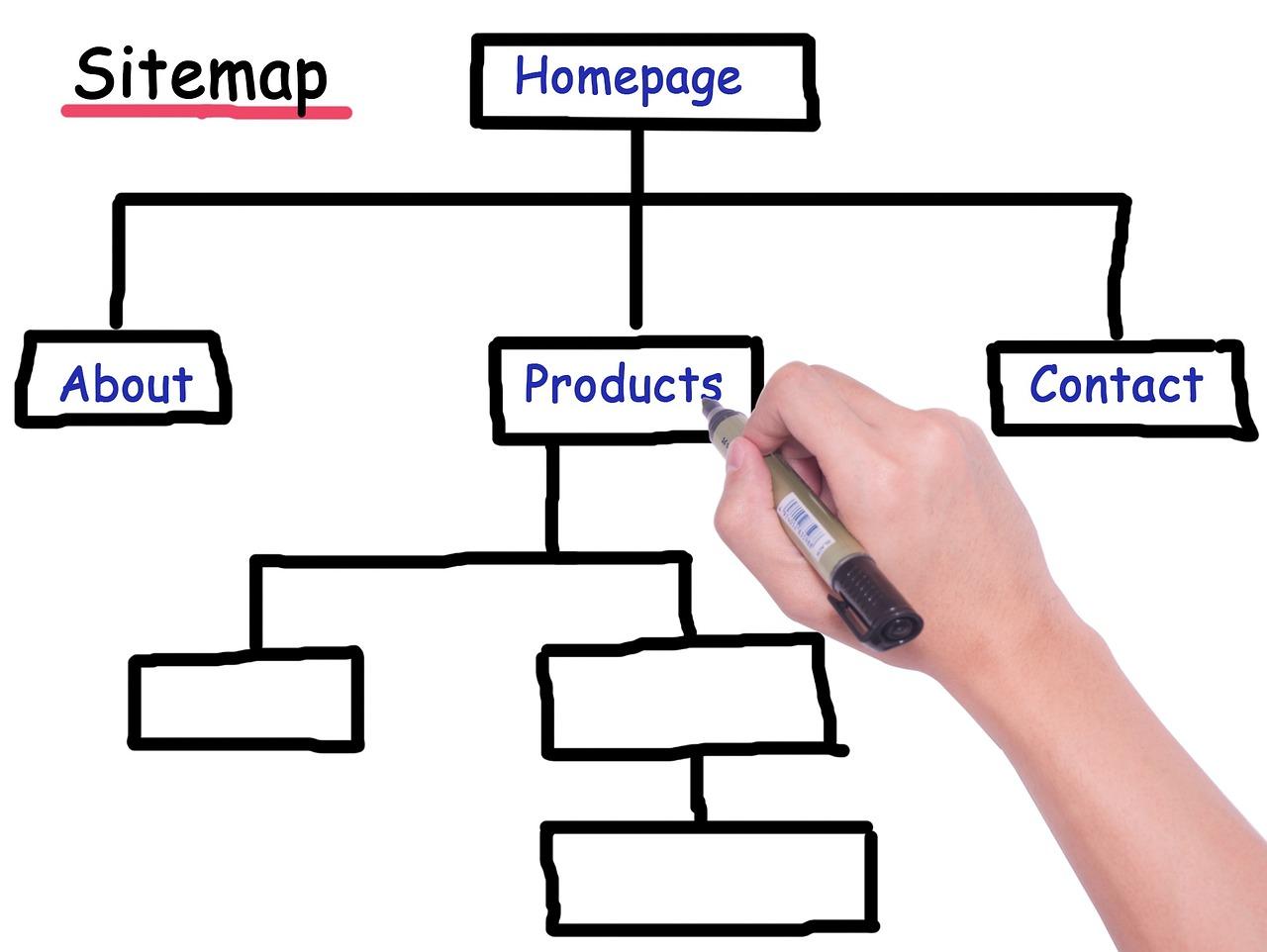
Start with a site map that outlines your main topics and subtopics. This visual representation can help you see how different sections relate to each other. You can use tools like Lucidchart or even a simple whiteboard to draft your ideas. Here’s a simple example:
Main Topic
Subtopic 1
Subtopic 2
SEO Strategies
On-Page SEO
Off-Page SEO
Content Marketing
Blogging
Video Content
Use Clear Navigation
Navigation menus should reflect your content hierarchy. Keep them simple and intuitive. Ideally, a user should be able to reach any page within three clicks. Limit your top-level categories and use dropdowns for subcategories when necessary. For example:
Home
About Us
Services
SEO Services
Content Strategy
Blog
Implement Hierarchical URLs
Organize your URLs to reflect your content hierarchy. For instance, www.example.com/services/seo-services is clearer and more SEO-friendly than www.example.com/page1. This type of structure helps both users and search engines understand where they are within your site.
Optimize Internal Linking
Use internal links to guide users and search engines through your content. Link to related articles and categories within your site to create a web of information. For example, if you have a blog post about on-page SEO, link to your service page offering SEO consultations. This not only improves user experience but also enhances the flow of link equity throughout your site.
Leverage Breadcrumbs
Breadcrumbs provide users with a clear path of navigation and help search engines understand your site structure. Implement them in your design to show users where they are and how they got there. For example:
Home > Blog > SEO Strategies
Make Content Scannable
Keep in mind that users often skim content. Use headings, bullet points, and short paragraphs to make your information digestible. The easier it is for users to find what they’re looking for, the longer they’ll stay on your site.
By applying these principles of content hierarchy, you’re not just enhancing your site’s user experience—you’re also boosting its search engine visibility. Remember, a well-organized website is a foundation for SEO success.
When it comes to maintaining a healthy website, avoiding duplicate content is a critical factor that can significantly influence your SEO efforts. Duplicate content can confuse search engines, leading to suboptimal rankings and a poor user experience. By structuring your website intelligently, you can minimize the risk of content duplication while also enhancing navigability and user engagement.
One effective way to prevent duplicate content is by implementing a clear and logical URL structure. A well-organized URL hierarchy not only helps search engines understand the relationship between various pages but also aids users in navigating your site. Here are some tips for creating an effective URL structure:
Use descriptive keywords that reflect the content of the page.
Avoid using parameters in URLs whenever possible.
Keep your URLs short and concise.
Another strategy to consider is the use of canonical tags. These tags inform search engines which version of a webpage should be considered the “master” copy, allowing you to maintain multiple versions of similar content without penalizing your SEO. This is particularly useful for e-commerce websites with multiple product variations. Here’s a simple example:
Page URL
Canonical Tag
example.com/product?color=blue
example.com/product
example.com/product?color=red
example.com/product
Implementing 301 redirects is also crucial for maintaining a clean content structure. If you have outdated or duplicate pages, setting up a 301 redirect to the most relevant or original page helps consolidate your SEO efforts and ensures that users always land on the best version of your content.
Moreover, consider organizing your content into clusters or topic pillars. This strategy involves creating a main pillar page that covers a broad topic and linking to supporting pages that dive deeper into specific subtopics. This not only helps eliminate duplication but also boosts your site’s authority on the main topic. For instance, a pillar page on “Digital Marketing” can link to pages about SEO, PPC, and content marketing.
regular content audits are essential. Conducting these audits helps you spot any duplicate content issues you might have missed. During these audits, you can:
Identify and consolidate similar pages.
Update or remove outdated content.
Ensure that your internal linking structure supports the most important pages.
By employing these strategies, you can effectively avoid duplicate content pitfalls and create a streamlined website architecture that appeals to both users and search engines alike. A well-structured website not only improves your SEO but also enhances the overall user experience, paving the way for increased engagement and conversions.
Analyzing Competitor Websites for Best Practices
When striving for optimal website architecture and SEO performance, analyzing competitor websites can unveil invaluable insights. By observing what your competitors are doing right, you can adopt best practices that enhance your own site’s architecture. Here are some key elements to focus on:
Navigation Structure: Take note of how competitor websites organize their menus. A clear and intuitive navigation structure not only improves user experience but also helps search engines understand site hierarchy.
URL Structure: Look at how competitors format their URLs. Clean, keyword-rich URLs tend to perform better in search rankings. Aim for simplicity while ensuring relevance to the page content.
Responsive Design: Mobile-friendliness is crucial in today’s digital landscape. Review how competitors optimize their sites for various devices and screen sizes, as this significantly impacts user engagement and rankings.
Additionally, tools like SEMrush and Ahrefs can assist in analyzing competitor keywords and backlinks. Understanding which keywords drive traffic to their sites can inspire your own keyword strategy. Here’s a simple comparison of essential metrics you might gather:
Competitor
Organic Traffic
Main Keywords
Backlinks
Website A
15,000
SEO tips, website architecture
120
Website B
20,000
best SEO practices, website design
150
Website C
10,000
site structure, SEO optimization
80
Don’t overlook the power of content layout and design. Analyze how competitors structure their content. Are they using headers effectively? Are images optimized for SEO? A well-structured page not only appeals to visitors but also enhances search engine crawling.
pay attention to loading speed. Utilize tools like Google PageSpeed Insights to see how fast your competitors’ sites load. Sites that load quickly tend to retain users better and rank higher on search engines.
By dissecting your competitors’ websites, you can gather a treasure trove of ideas to bolster your site’s architecture and, ultimately, its SEO performance. The goal is to create a user-friendly experience that naturally encourages higher engagement and better rankings.
Regularly Updating Your Website Architecture for Ongoing Success
Maintaining a robust website architecture isn’t just a one-time task; it’s an ongoing process that can significantly impact your SEO efforts. As search engines evolve and user behaviors change, so must your website’s framework. Regular updates ensure that your site remains relevant, functional, and easy to navigate, which ultimately enhances user experience and boosts your search engine rankings.
One crucial aspect of maintaining your website architecture is to conduct regular audits. This involves assessing the structure of your site, checking for broken links, outdated content, and ensuring that all pages are easily accessible. You can utilize tools like Google Search Console or SEMrush to identify issues and gather insights into user behavior. By fixing these issues proactively, you can prevent a decline in your search engine rankings.
Another effective strategy is to review and optimize your URL structure. Clean, descriptive URLs not only help search engines understand your content but also make it easier for users to remember and share. Ensure that your URLs are concise and aligned with your target keywords. For instance, instead of a generic URL like www.example.com/page123, consider something more descriptive like www.example.com/website-architecture-tips.
Incorporating responsive design is essential, especially as mobile browsing continues to rise. A mobile-optimized site improves user experience, which is a crucial ranking factor for search engines. Regularly updating your design to accommodate new devices and screen sizes can make a world of difference in keeping users engaged and reducing bounce rates.
Don’t underestimate the power of internal linking. Regularly revisiting your content to create new internal links can boost the authority of your pages. This not only helps with SEO but also guides users to discover more of your content. For example, if you have a blog post about SEO best practices, link to related articles or resources within your site to create a cohesive network of information.
Strategies
Benefits
Regular Audits
Identify and resolve issues for better performance
Optimized URL Structure
Enhances user experience and SEO
Responsive Design
Improves mobile accessibility and engagement
Internal Linking
Boosts authority and user navigation
Lastly, keep an eye on your site speed. A slow-loading website can deter visitors and negatively impact your SEO. Regularly monitor your site’s load time and make necessary adjustments such as optimizing images, leveraging browser caching, and minimizing JavaScript. A fast site not only provides a better user experience but also supports your SEO goals.
By consistently updating and refining your website architecture, you’re not just keeping up with the latest trends—you’re setting yourself up for ongoing success. Remember, a well-structured website is a living entity that requires attention and care. Make it a habit to revisit your strategies regularly, ensuring that they align with your goals and the ever-evolving digital landscape.
Q1: Why is website architecture important for SEO? A: Great question! Website architecture is like the foundation of a house; if it’s not solid, the entire structure can crumble. A well-organized website helps search engines crawl and index your pages effectively, which can lead to better rankings. When users find it easy to navigate your site, they’re more likely to stay longer, reducing bounce rates and boosting your SEO performance.
Q2: What are the key components of a good website architecture? A: Think of your website as a tree. The trunk represents your homepage, and the branches symbolize your categories and subcategories. A clear hierarchy is crucial! Key components include a logical structure, a user-friendly menu, internal linking, and mobile-friendliness. Each page should be easily accessible, ideally within three clicks from the homepage.
Q3: Can you explain the importance of a sitemap? A: Absolutely! A sitemap is like a map for both users and search engines. It lists all your website’s pages, making it easier for search engines to discover and index your content. Submitting a sitemap to Google Search Console can enhance your site’s visibility and ensure all pages are crawled. Plus, it helps users navigate your site more efficiently!
Q4: How do internal links impact SEO? A: Internal links are your best friends in website architecture! They help distribute page authority throughout your site and guide users to related content. By strategically linking your pages, you not only enhance user experience but also help search engines understand the relationship between your content. This can significantly improve your SEO rankings!
Q5: What role does mobile optimization play in website architecture? A: With more people browsing on mobile devices, mobile optimization is non-negotiable! A mobile-friendly design improves user experience and is a ranking factor for search engines. Responsive design is key, ensuring your site looks great and functions well on any device. Remember, a happy visitor is likely to become a loyal customer!
Q6: What are some common mistakes to avoid in website architecture? A: Here are a few pitfalls to steer clear of:
Overcomplicating Navigation: Keep it simple and intuitive.
Ignoring URL Structure: Use clear, descriptive URLs that reflect your content.
Forgetting About Alt Text: Optimize images with alt text for better SEO.
Avoiding these mistakes can significantly enhance your site’s performance!
Q7: Can you give an example of successful website architecture? A: Definitely! Take a look at Amazon. Their website is well-structured with clear categories and subcategories, making it easy for users to find what they need. Their internal linking strategy helps guide users to related products, and their site loads rapidly on all devices. This architecture contributes to their high search engine rankings and user engagement.
Q8: How often should I revisit my website architecture? A: Regularly! As your business grows and evolves, so should your website architecture. It’s a good practice to revisit your site at least once a year, or whenever you add significant new content or features. Keeping your architecture aligned with your current goals will help maintain optimal performance and SEO effectiveness.
Q9: Any final tips for improving website architecture for SEO? A: Absolutely! Here’s a quick recap:
Prioritize user experience in design and navigation.
Utilize clear and descriptive URLs.
Implement a mobile-first design approach.
Regularly update and audit your sitemap.
Focus on internal linking to boost SEO authority.
Follow these tips, and you’ll be well on your way to a robust website architecture that enhances your SEO success!
—
Feel free to dive into these strategies, and remember, a well-structured website is the cornerstone of effective SEO. Happy optimizing!
Final Thoughts
Conclusion
And there you have it! Crafting a robust website architecture isn’t just a technical task; it’s a strategic approach that can significantly boost your SEO efforts. By implementing these 13 proven tips, you’ll not only enhance your site’s navigability but also improve its visibility on search engines. Remember, the easier you make it for both users and search engines to navigate your site, the more likely you are to see an increase in traffic and conversions.
So, why wait? Dive in and start optimizing your website’s structure today. Whether you’re a seasoned pro or just getting started, these strategies can help elevate your online presence. If you’ve got questions or want to share your own experiences, drop a comment below—I’d love to hear from you!